
Snowflake Admin Dashboard

Overview
Monitor your Snowflake data source with a modern, data-focused interface.
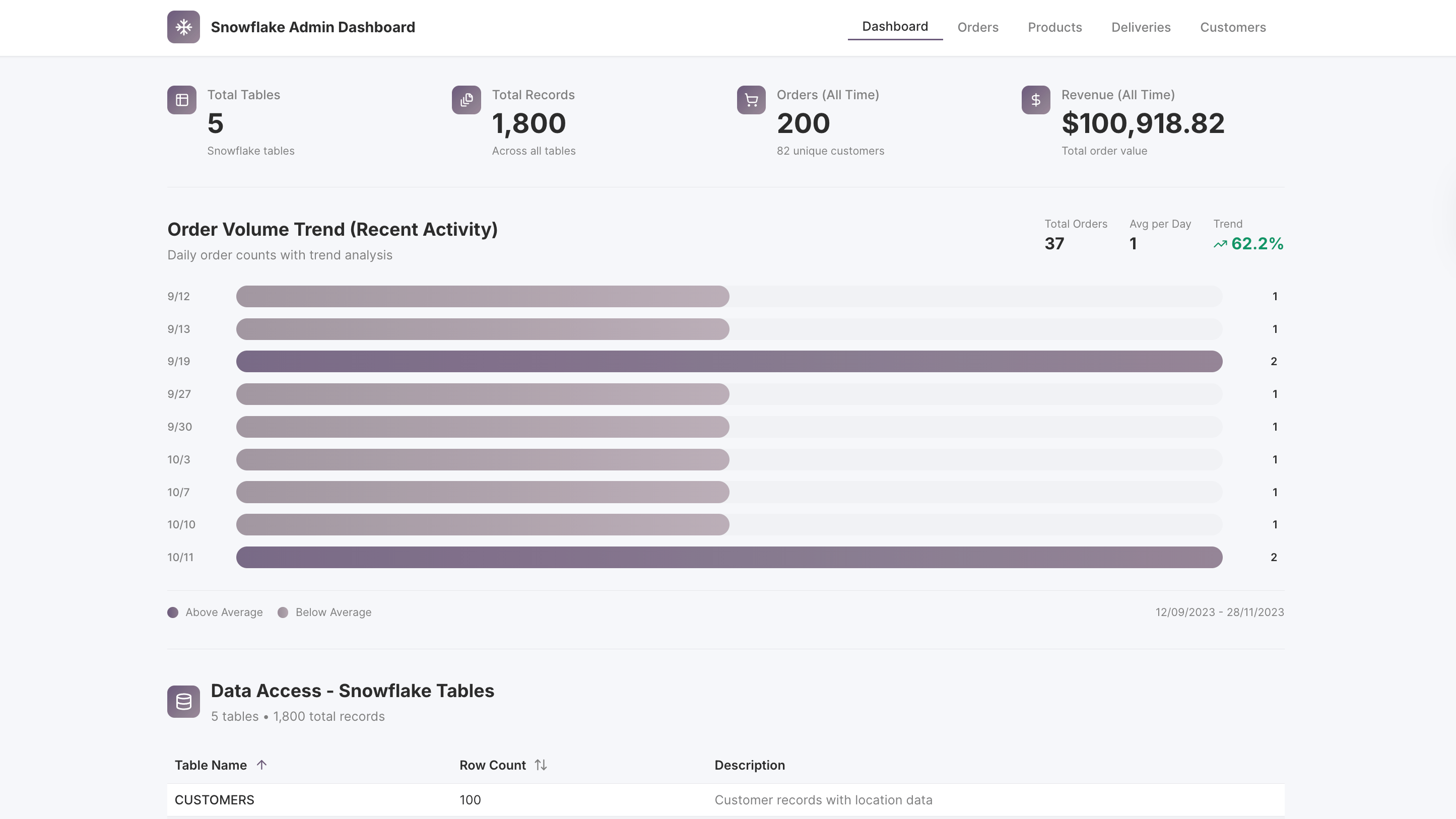
The Snowflake Admin Dashboard centralizes key metrics, operational data, and analytics into a single, intuitive platform, giving developers, analysts, and business users a clear overview of tables, queries, orders, products, deliveries, and customer trends.
Key Features
Comprehensive Data Monitoring & Table Insights
View all Snowflake tables with row counts, last updated timestamps, and schema information. Monitor recent activity and track table usage trends to stay on top of your data landscape.
Orders & Deliveries Oversight
Analyze orders with spreadsheet-style tables showing details like Order ID, Customer, Status, Date, and Total. Drill down into deliveries to review timelines, performance trends, and fulfillment metrics.
Product Performance & Analytics
Track top products by revenue, units sold, and sales trends. Gain insights into category performance and inventory impact with sortable, searchable tables and charts.
Customer Insights & Segmentation
Access customer data including contact info, location, and purchase statistics. Identify top states by customer count and monitor engagement trends across your customer base.
Interactive Charts & Filtering
Visualize order volumes, delivery distributions, and product trends through dynamic charts that update based on filters, date ranges, or category selection.
Use Cases
- Admin dashboards for Snowflake data monitoring
- Operational reporting for sales, deliveries, and inventory
- Customer and product performance analytics
- Data exploration for business intelligence teams
Start Building Your Own Snowflake Admin Dashboard
Use this Snowflake Admin Dashboard template as a foundation to create a fully custom data monitoring platform. Connect live Snowflake data, track key operational metrics, visualize trends, and explore tables with intuitive filters and charts using UI Bakery’s low-code tools.

How the Snowflake Admin Dashboard works
UI Bakery enables you to transform your data into dynamic internal tools, leveraging a combination of pre-built and customized components.
- To initiate, click "Sign up".
- Establish your organization and create app "From template"
- Customize your generated application visually by intuitively dragging and dropping components and crafting queries for your resources.
- Expand the capabilities of this application by linking to your personal database, kickstarting the development of robust internal tools.
Related Snowflake Admin Dashboard templates



Related Snowflake Admin Dashboard templates
Frequently Asked Questions
How does Snowflake Admin enhance business operations?
Snowflake Admin streamlines data management and analysis, allowing businesses to monitor key metrics and trends efficiently. Its comprehensive dashboard offers a unified view of various business aspects, aiding in quick decision-making.
Is Snowflake Admin customizable for different business needs?
Yes, the Snowflake Admin template is highly customizable. It can be tailored to fit the specific requirements of different businesses, making it versatile for various industry applications.
Can Snowflake Admin integrate with other systems and data sources?
Absolutely. The template is designed to integrate seamlessly with various data sources and systems, ensuring smooth data synchronization and management.
Is the template user-friendly for non-technical users?
Yes, Snowflake Admin is designed with a focus on user experience, ensuring that it is accessible and easy to use, even for those with limited technical expertise.

"The UI Bakery platform offers a cost-effective approach to creating applications. With UI Bakery, you can achieve your app development goals without breaking the bank."
