
SQL Server Admin

Overview
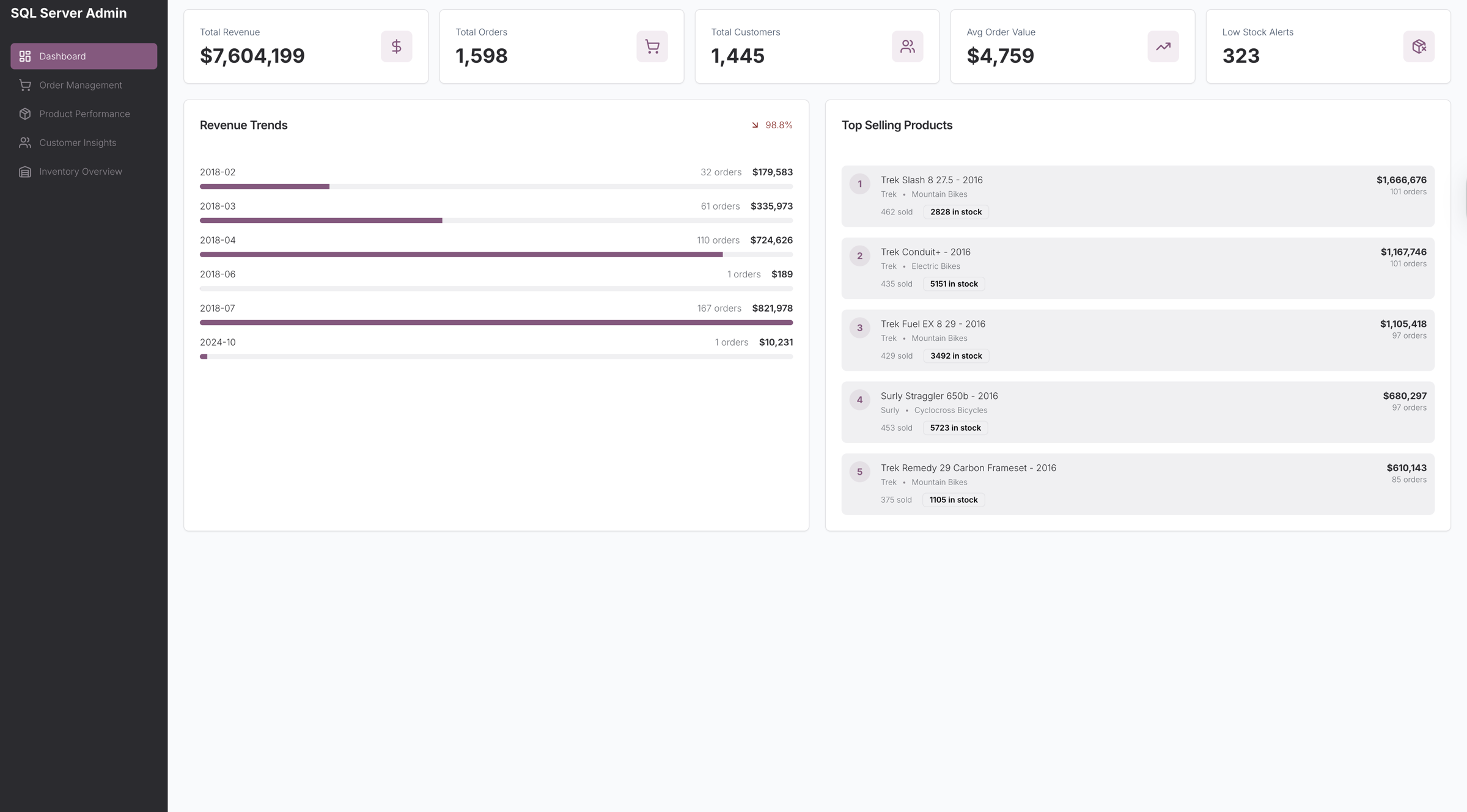
Monitor and manage your e-commerce or retail operations with the SQL Server Admin app.
Designed to centralize key business data, it provides insights into revenue, orders, products, customers, and inventory in one clean, interactive interface. Track performance trends, optimize stock levels, and gain actionable insights for informed decision-making.
Key Features
Comprehensive Business KPIs & Trends
Visualize total revenue, total orders, average order value, and low stock alerts at a glance. Track revenue and top-selling product trends for fast business insights.
Order Management & Tracking
Manage all orders efficiently with searchable lists, status filters (all, pending, processing, completed, rejected), and store-level filtering. Access detailed order information including dates, customer info, staff, and item-level details through a sidebar view.
Product Performance Analytics
Monitor product sales, stock levels, and brand/category performance. Drill into individual products to view detailed information including stock by store and historical performance metrics.
Customer Insights & Analytics
Analyze customer value with searchable lists and drill-down views showing contact details, order statistics, and purchase history to inform retention and engagement strategies.
Inventory Overview & Stock Monitoring
Track total items, low stock, and critical stock levels. Filter inventory by store or stock status to ensure optimal stock management and proactive replenishment.
Use Cases
- E-commerce dashboards for online retailers
- Retail operations monitoring tools for store managers
- Inventory & order tracking for distribution networks
- Customer analytics dashboards for CRM insights
Start Building Your Own SQL Server Admin App
Use this SQL Server Admin template to centralize your business operations. Connect live SQL Server data, track KPIs, manage orders, analyze product and customer performance, and optimize inventory workflows with an intuitive, data-driven interface.

How the SQL Server Admin template works
UI Bakery enables you to transform your data into dynamic internal tools, leveraging a combination of pre-built and customized components.
- To initiate, click "Sign up".
- Establish your organization and create app "From template"
- Customize your generated application visually by intuitively dragging and dropping components and crafting queries for your resources.
- Expand the capabilities of this application by linking to your personal database, kickstarting the development of robust internal tools.
Related SQL Server Admin templates



Related SQL Server Admin templates

"The UI Bakery platform offers a cost-effective approach to creating applications. With UI Bakery, you can achieve your app development goals without breaking the bank."
