

Best Workflow Approval Software for Teams in 2026
%201.png)
Updated:
May 4, 2026
Workflow approval software helps teams review, approve, reject, and track business requests without chasing decisions across Slack, email, spreadsheets, and disconnected tools.
The right workflow approval software depends on what your team is approving. A simple content review process may only need a project board. A finance team approving invoices, purchase orders, or vendor requests usually needs something more structured. A support or sales team may need approval workflows connected to live CRM, ticketing, billing, or database records.
This guide compares the best workflow approval software for teams in 2026, including where each tool fits, what tradeoffs to expect, and when UI Bakery is the better choice for building custom approval apps on top of real business data.
Quick comparison: best workflow approval software in 2026
What is workflow approval software?
Workflow approval software is a system for routing requests, documents, records, or operational decisions through the right people before work moves forward.
In a manual process, approvals often happen across scattered tools. A requester sends a message. A manager replies in Slack. Finance asks for more details by email. The final decision is copied into a spreadsheet. Later, nobody knows who approved what, when, or why.
Workflow approval software gives that process structure. It usually includes request forms, approval steps, decision rules, notifications, role-based permissions, and an audit history. In more advanced cases, it also connects approvals to databases, CRMs, ERPs, file storage, APIs, or internal business apps.
Typical workflow approval software is used for:
- invoice approvals
- purchase requests
- vendor approvals
- refund approvals
- sales discount approvals
- document reviews
- access requests
- campaign approvals
- procurement workflows
- employee requests
- legal or compliance reviews
For example, Microsoft describes Power Automate approvals as a way to automate sign-off requests while still keeping human decision-making inside workflows. Common examples include vacation requests, document sign-offs, and expense report approvals. (Microsoft Learn)
When teams need workflow approval software
Most teams do not look for workflow approval software because everything is going well. They look for it because the current process has become too slow, too manual, or too risky.
You probably need workflow approval software when:
- approval requests get lost in Slack or email
- spreadsheets are used as the approval tracker
- nobody can quickly see what is pending
- managers approve things without enough context
- decisions need to follow rules based on amount, role, department, region, or customer type
- approval history matters for finance, compliance, or internal accountability
- approvals depend on data stored in databases, CRMs, ERPs, or internal tools
- teams keep asking developers to build small approval dashboards manually
This is especially common when teams move from informal operations to structured systems. A finance team may start with invoice approvals. A support team may need refund and escalation approvals. A sales team may need discount approvals. A marketing team may need campaign budget approvals. A data team may need access request approvals before sensitive records are exposed.
If the process currently lives in spreadsheets, one practical path is to convert Excel workflows into web apps with AI, then add permissions, approval states, audit trails, and integrations on top.
What matters most when choosing workflow approval software
The best workflow approval software depends on how complex the process is and where the data lives.
A small team approving design drafts may only need a simple board. A finance team approving invoices against purchase orders needs something more structured. A support team approving refunds may need a custom interface that shows ticket history, customer records, order data, and payment details in one place.
Here are the key criteria to consider.
Workflow flexibility
Approval workflows rarely stay simple.
At first, a request may only need one manager approval. Later, the process becomes conditional:
- invoices above a certain amount require finance leadership approval
- enterprise discounts require sales leadership approval
- refunds above a threshold require manager approval
- rejected items return to the requester
- overdue approvals need escalation
- legal review is required only for certain contract values
- different departments follow different approval paths
This is why flexibility matters. A good workflow approval software platform should support conditional logic, multi-step approval paths, escalation rules, and status changes.
For simple workflows, a no-code workflow builder may be enough. For more operational workflows, a custom internal app builder is often a better choice because the interface, data, and business logic can match the real process.
Data integration
Approvals are rarely isolated from business data.
An invoice approval workflow may need vendor records, purchase orders, attached PDFs, payment history, and accounting status. A refund approval workflow may need customer data, order data, ticket history, and payment information. A sales discount workflow may need CRM data, deal size, pricing rules, and contract terms.
That is why integration is one of the most important factors.
Workflow approval software should connect to the systems where the relevant data already lives, such as:
- SQL databases
- REST APIs
- GraphQL APIs
- CRMs
- ERPs
- spreadsheets
- file storage
- data warehouses
- internal services
For example, a finance team can start with an invoice approval dashboard and adapt it to its vendor, purchase order, payment, and document review process. If approvals involve file review or storage operations, a template like S3 Explorer can be useful for building internal workflows around stored files and assets.
Permissions and access control
Approval workflows often involve sensitive data.
Finance approvals may expose vendor payments or invoices. Sales approvals may expose discounts and contract terms. Support approvals may expose customer data. Data access workflows may expose internal datasets or operational records.
At a minimum, workflow approval software should support:
- role-based access
- different permissions for requesters, reviewers, approvers, and admins
- audit history
- secure data access
- user management
- approval ownership
- approval visibility by team or role
This is one reason many teams prefer to build approval workflows as internal tools instead of relying only on generic task automation. The approval interface needs to show enough context to make the right decision, but not expose sensitive information to the wrong people.
Audit history
A good approval workflow should make it easy to answer:
- who submitted the request?
- who reviewed it?
- who approved or rejected it?
- when did the decision happen?
- what changed before approval?
- why was the request escalated?
- what record or document was approved?
This matters for finance, compliance, security, operations, and management reporting.
Nintex, for example, positions workflow automation as suitable for everything from simple approvals to more complex processes such as quote-to-cash, loan processing, employee onboarding, and education workflows. (Nintex)
Interface quality
Approvers do not want another confusing system. They need one clear screen that shows:
- the request
- the requester
- relevant business data
- attached files
- current status
- comments
- approval history
- risks or rule matches
- approve, reject, send back, or escalate actions
This is where custom approval apps become valuable. Instead of forcing users into a generic approval inbox, teams can build a purpose-specific interface for the exact process.
A support team can build refund approval dashboards as part of a broader support operations workspace. A sales team can build deal desk and discount approval workflows around the same operational patterns used in sales internal tools. A marketing team can manage campaign, content, and budget approvals through custom apps similar to the workflows described for marketing teams.
Build speed and maintainability
Approval workflows change constantly.
A workflow that works today may need new fields, new approvers, new rules, or new integrations next quarter. If every change requires a full engineering cycle, the workflow becomes another bottleneck.
For developer-led teams, approval workflows often resemble CRUD applications: users create requests, reviewers read details, approvers update statuses, and admins manage records. Teams using backend frameworks can think through these patterns with resources like the FastAPI CRUD operations guide, while UI-focused teams can use the Bootstrap CRUD operations guide as a reference for building structured data interfaces.
For teams that want to move faster, UI Bakery’s AI App Generator can help generate a first version of a data-driven approval app from a prompt, then teams can refine the interface, logic, permissions, and integrations from there. UI Bakery describes the AI App Generator as a way to generate functional, data-driven web apps from a prompt. (UI Bakery)
Best workflow approval software for teams in 2026
1. UI Bakery
UI Bakery is the best fit when workflow approval software needs to become a real internal app connected to business data.

Many approval tools are good at moving a request from one person to another. UI Bakery is better suited for cases where approvers need a custom interface with live records, documents, comments, role-based actions, and business-specific logic.
For example, a finance team can build an invoice approval app where users review vendor details, invoice amounts, purchase orders, attached documents, approval history, and payment status in one place. A support team can build refund approval workflows connected to customer, order, and ticket data. A sales team can create discount approval dashboards based on deal size, customer segment, margin, or region.
UI Bakery is especially useful when approvals are part of a larger internal operations system. The platform is positioned around building dashboards, workflows, admin panels, and operational apps directly on live databases and services.
Instead of starting from a blank app, teams can use templates and adapt them to their process. The Invoice Approval Software Dashboard is the closest workflow approval template for finance teams. For data-heavy operations, a template like Snowflake Admin can help teams manage workflows around warehouse data. For file-based review processes, S3 Explorer can serve as a starting point for internal tools that involve stored files, documents, or assets.
UI Bakery also works well when teams are replacing spreadsheets. A team can start by turning an Excel-based approval tracker into a proper web app using Convert Excel to Web Apps with AI, then add approval states, custom actions, and access control.
For teams comparing cost and deployment options, the UI Bakery pricing page is useful because workflow approval tools often start as one internal app and later expand into a broader internal tools platform.
Best for: custom internal approval apps, finance dashboards, operational workflows, support approval tools, sales approval tools, and database-connected business apps.
Choose UI Bakery if:
- approvals depend on live data
- users need a custom approval interface
- the workflow requires permissions and auditability
- spreadsheets are no longer enough
- developers do not want to build the entire app from scratch
- the approval workflow is part of a larger internal tool strategy
2. Kissflow
Kissflow is a strong choice for business teams that want no-code approval workflow software.
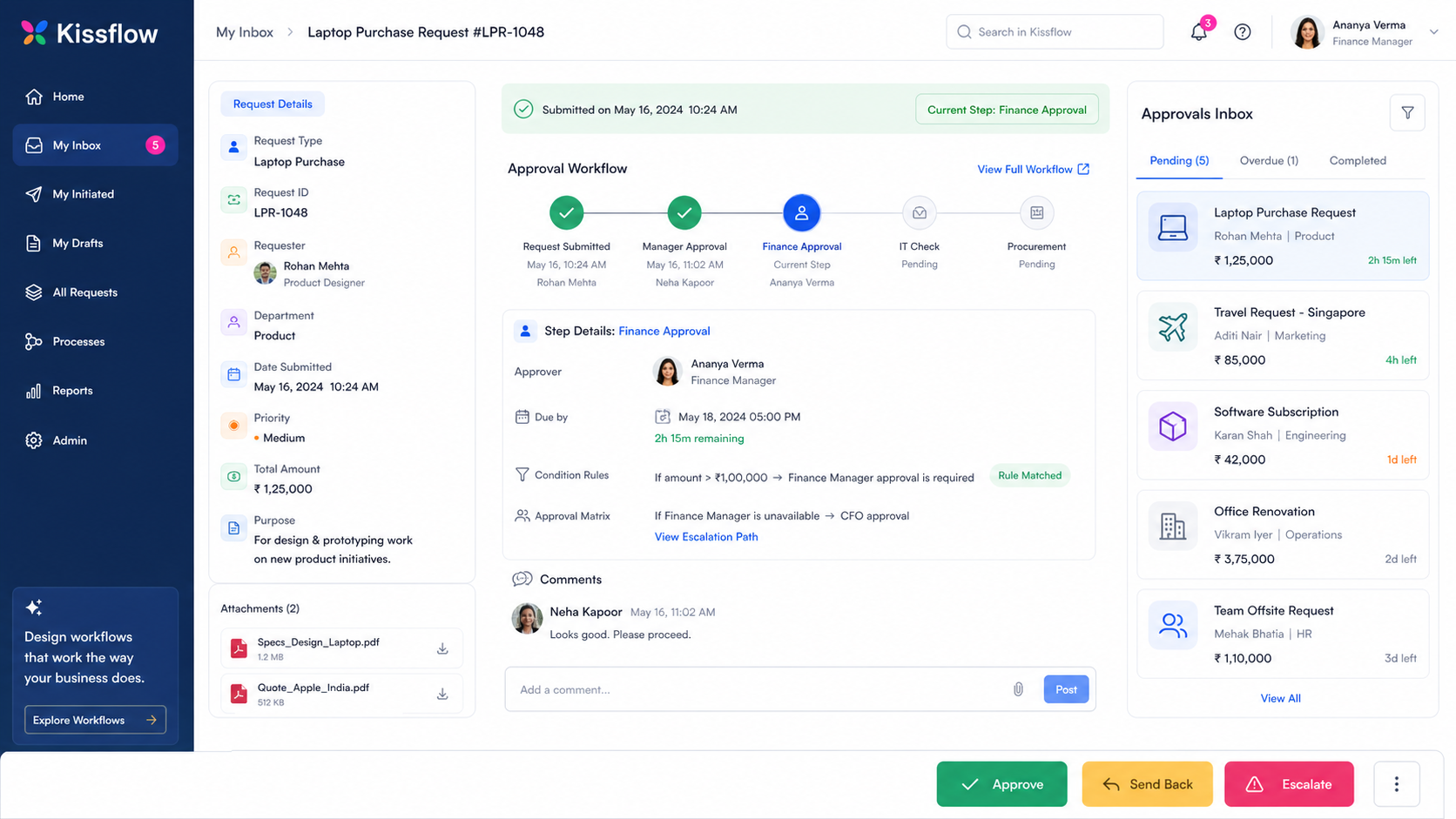
It focuses on streamlining requests, automating approval steps, and helping teams manage approval workflows without heavy development. Kissflow positions its approval workflow software around request management, automated approvals, and productivity improvements across teams. (Kissflow)
Kissflow is useful when the process is mostly form-based and business users need to configure workflows themselves. A department can create request forms, define approval paths, set conditions, and track the status of requests without waiting for a custom engineering project.
It is especially relevant for HR requests, procurement requests, invoice approvals, legal sign-offs, employee requests, and internal service workflows. Kissflow also has low-code app capabilities for teams that need more than a basic form workflow.
Best for: business-user-owned approval workflows.
Choose Kissflow if:
- the approval process is mostly form-based
- business users need to configure workflows themselves
- you want no-code approval routing
- the workflow does not need a highly custom interface on top of many backend systems
Main tradeoff: Kissflow is easier for business workflow configuration, but UI Bakery is usually a better fit when the approval process needs a custom internal app connected directly to databases, APIs, or operational systems.
3. ProcessMaker
ProcessMaker is best for teams that need formal business process automation rather than a lightweight approval board.
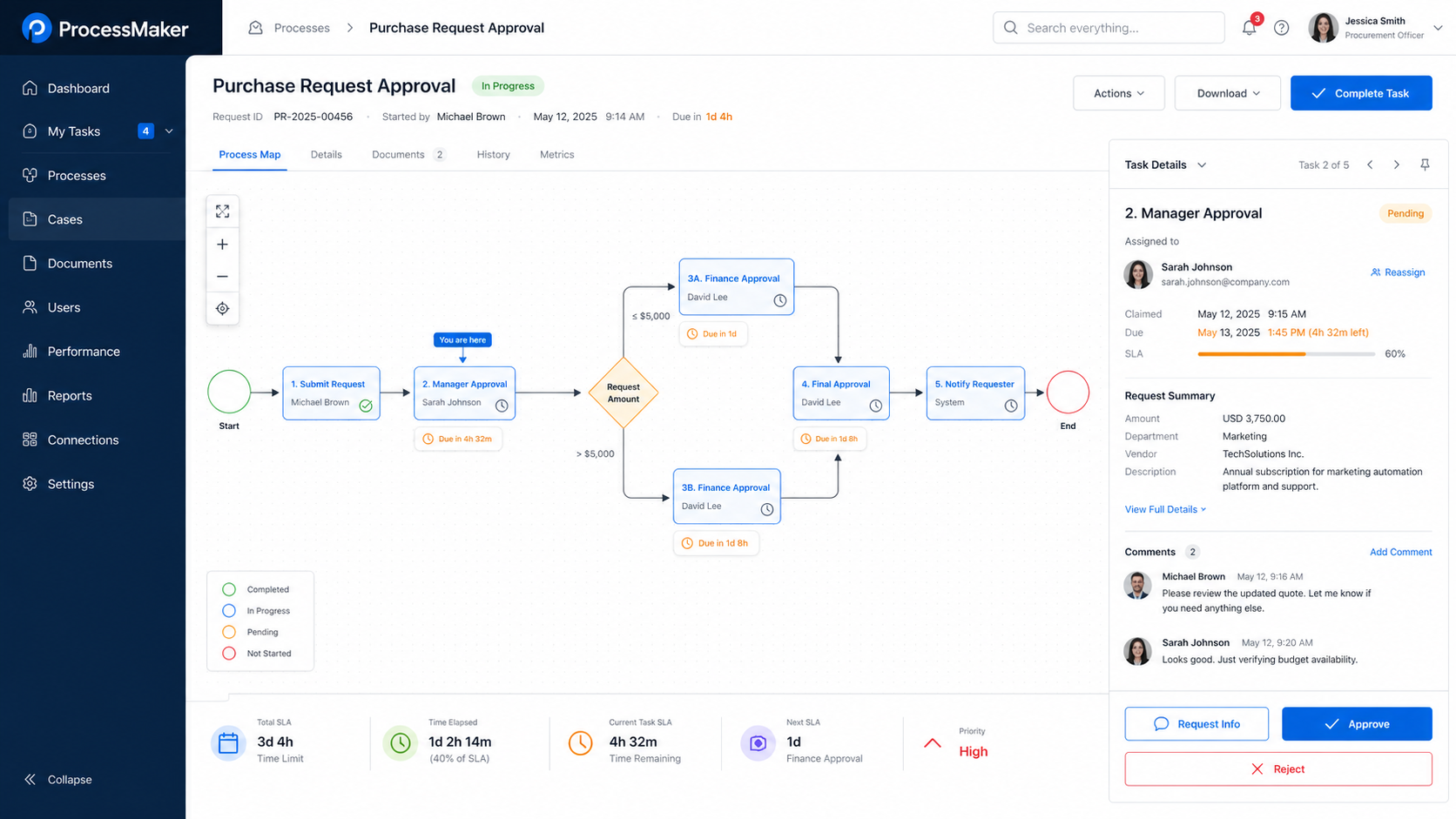
It is a business process automation platform used to design, run, report on, and improve business processes. ProcessMaker describes its platform as workflow and BPA software for designing, running, reporting, and improving processes. (ProcessMaker)
ProcessMaker is a good fit when approval workflows are part of larger process management requirements. For example, a procurement process may include request intake, manager approval, finance approval, vendor checks, document review, purchase order generation, and reporting. In that case, a BPM-style process map can be more useful than a simple approval queue.
ProcessMaker can also work well for organizations that need more structured process documentation, task ownership, SLA tracking, and process optimization.
Best for: enterprise business process automation and BPM-style approval workflows.
Choose ProcessMaker if:
- approvals are part of a formal business process
- the process has many stages and decision points
- you need process maps, human tasks, and reporting
- process governance is more important than fast app customization
Main tradeoff: ProcessMaker is strong for structured process automation, but it may be heavier than needed if the goal is to quickly build a custom approval dashboard for internal teams.
4. Nintex
Nintex is a strong enterprise option for workflow approval software, especially when approvals involve documents, cross-functional processes, and formal automation.
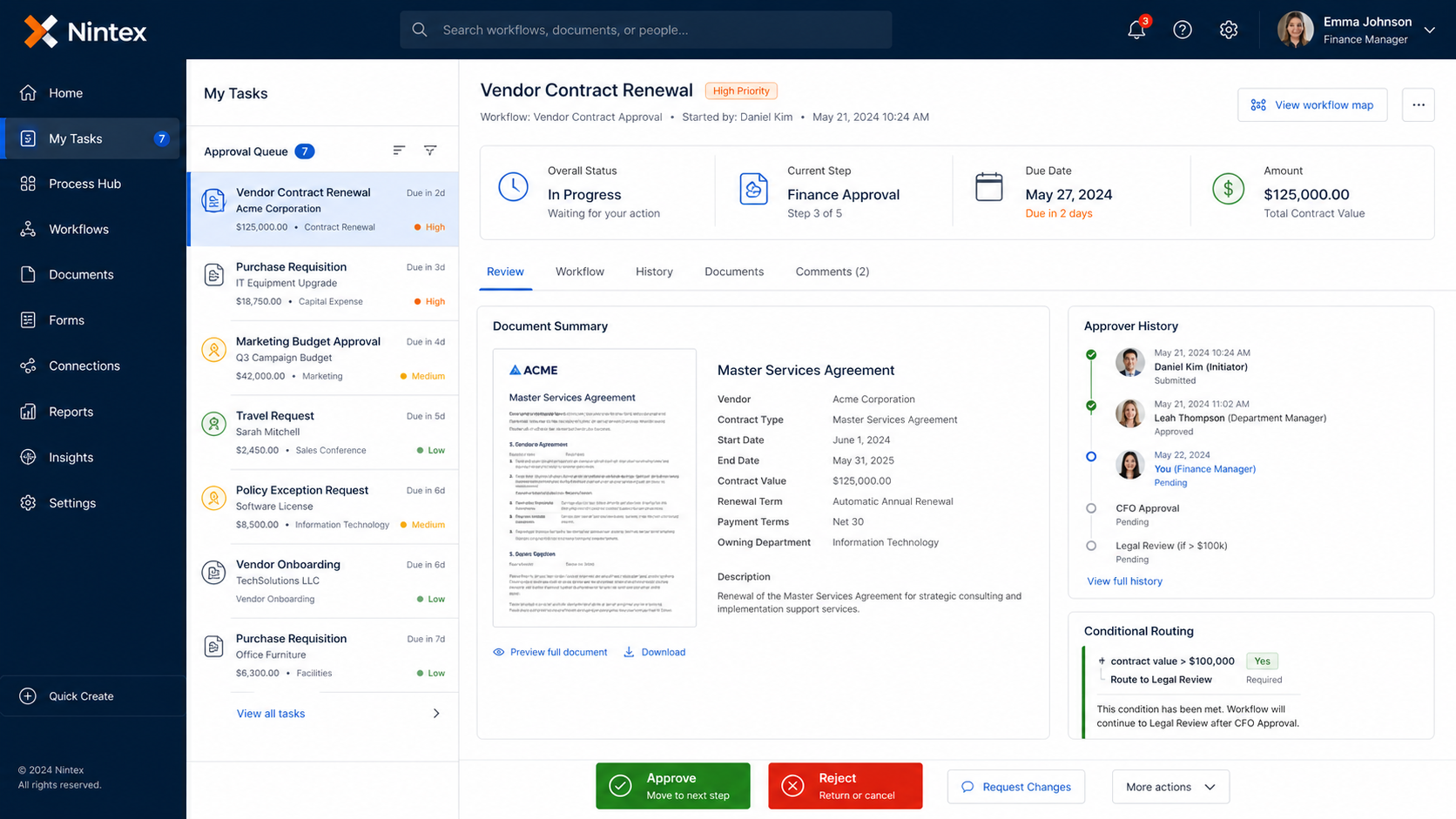
Nintex supports both simple approvals and more complex business processes such as quote-to-cash, loan processing, employee onboarding, and education workflows. (Nintex) It also has offerings for on-premise workflow automation, including approvals, document management, and data routing. (Nintex)
This makes Nintex a good fit for larger organizations that need standardized approval flows across departments. It can be especially useful for document approvals, contract reviews, onboarding workflows, compliance-driven processes, and enterprise process automation.
Best for: enterprise approval workflows and document-heavy process automation.
Choose Nintex if:
- your company needs enterprise-grade workflow automation
- approval workflows involve documents and formal review chains
- multiple departments participate in the process
- you need workflow governance, routing, and process consistency
Main tradeoff: Nintex can be powerful for enterprise automation, but teams that need a flexible internal app interface on top of databases and APIs may find UI Bakery more practical for custom operational workflows.
5. Pipefy
Pipefy is a process management and workflow automation platform that works well for teams managing recurring operational processes.
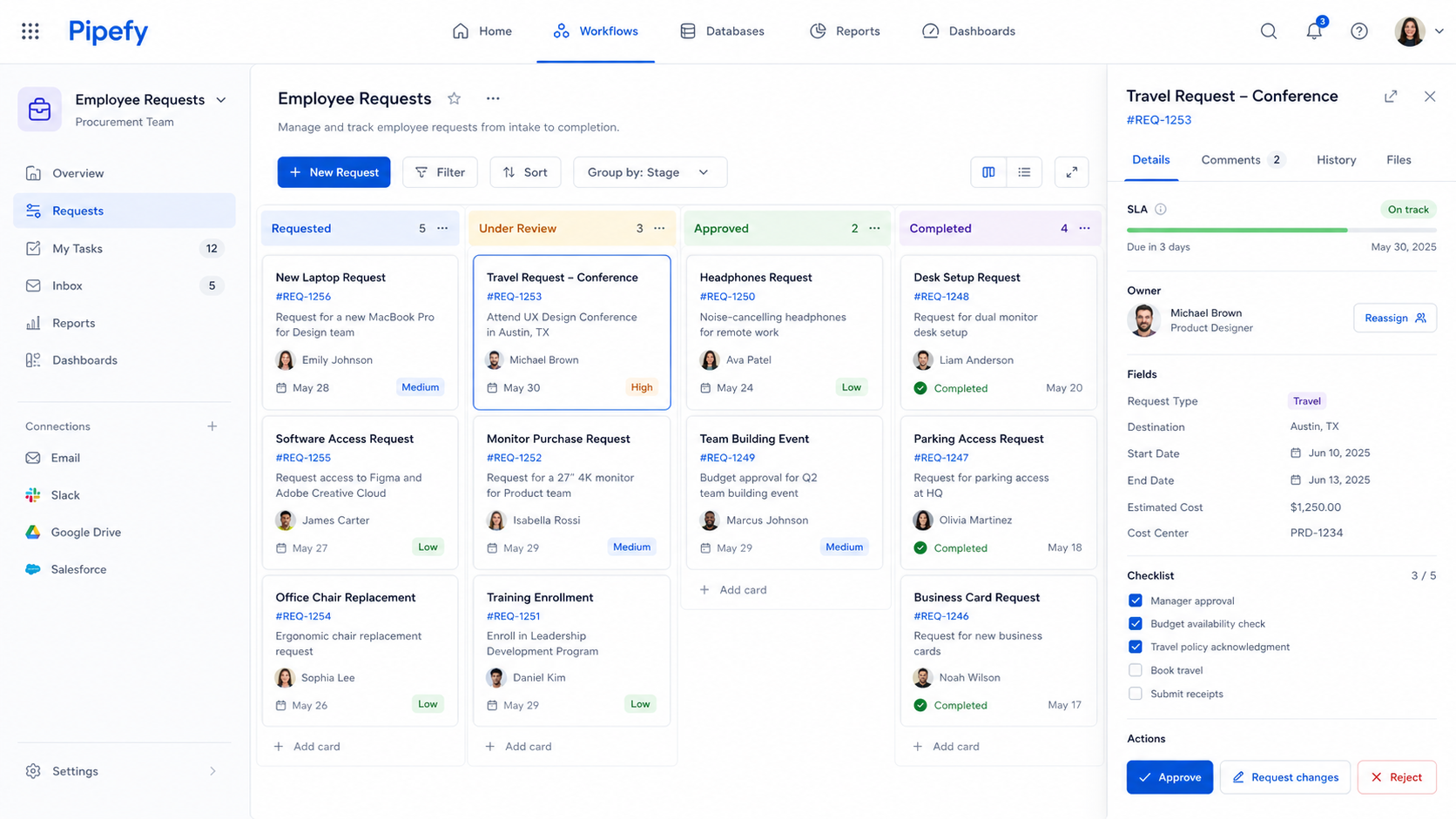
It is especially useful when approvals move through a pipeline or board-like process. Pipefy highlights flexibility for managing processes such as product development, orders, and approvals. (Pipefy) Its approval process content describes approval as a structured sequence of steps for reviewing, evaluating, and authorizing requests or documents. (Pipefy)
Pipefy can be a good fit for procurement, HR requests, finance operations, employee requests, service requests, and other processes where items move through stages like Requested, Under Review, Approved, and Completed.
The platform is useful when teams want visibility into process stages, ownership, SLA status, and bottlenecks.
Best for: operations teams that want visual process tracking and approval pipelines.
Choose Pipefy if:
- your approval process is pipeline-based
- SLA tracking matters
- teams need visibility into process stages
- requests move through repeatable operational steps
Main tradeoff: Pipefy is strong for process visibility, but UI Bakery is usually more flexible when the approval workflow needs a custom interface connected to live databases, APIs, warehouses, or internal services.
6. Monday.com
Monday.com is best for lightweight approval workflows that live inside project management and team collaboration.
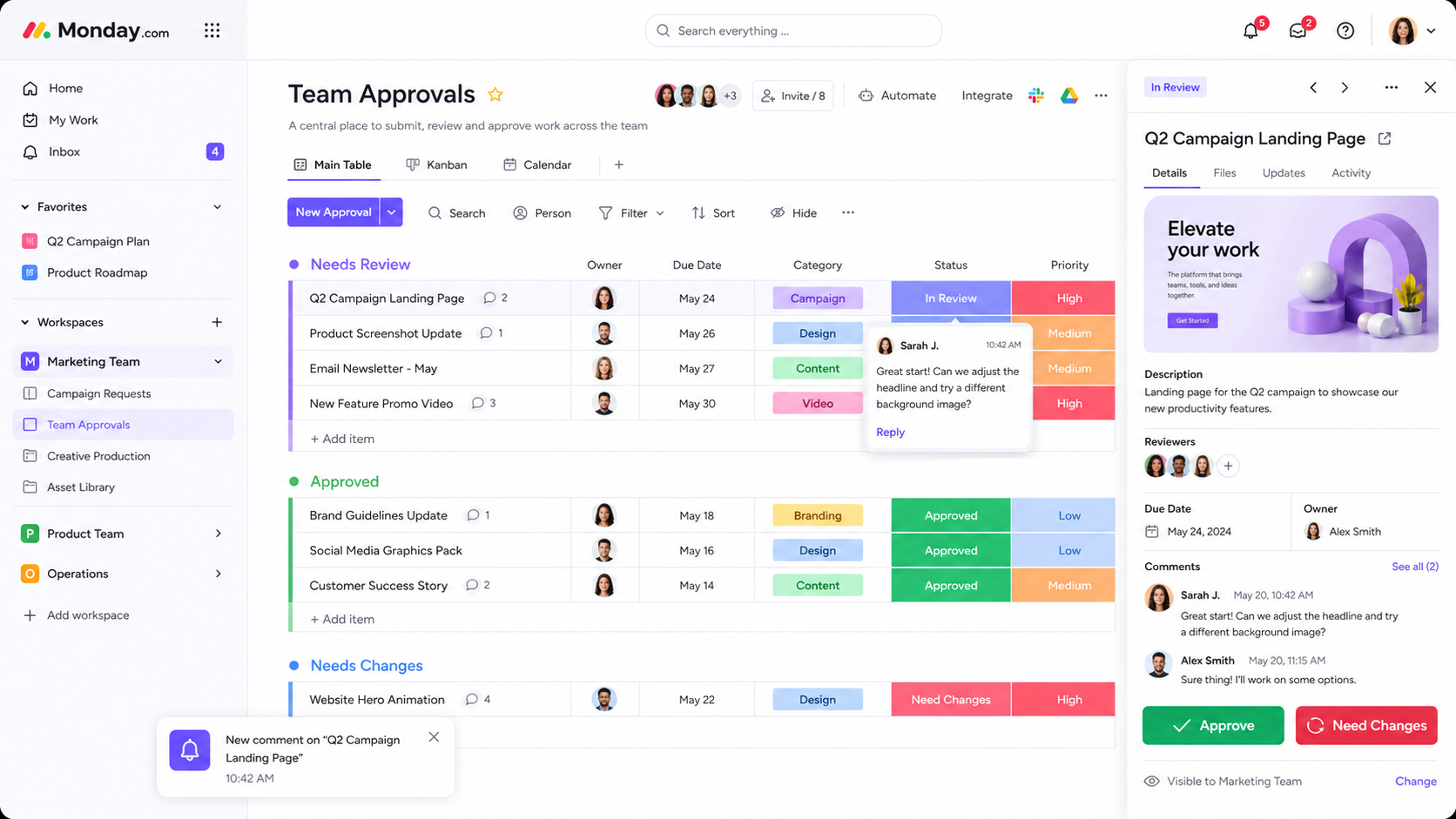
It works well for creative approvals, content approvals, campaign approvals, product review steps, design reviews, and other workflows where the approval is part of a broader project board. Monday.com content around document approvals emphasizes workflow customization and workflow management capabilities, and notes that the platform offers many pre-built workflow templates. (monday.com)
Monday.com is easy for teams that already manage work in boards. A marketing team can use it to track campaign assets from “Needs Review” to “Approved.” A product team can use it for design reviews. An operations team can use it for simple request tracking.
Best for: team approvals inside project boards.
Choose Monday.com if:
- your approvals are task-based
- the team already works in project boards
- visual status tracking matters
- you do not need deep backend integration
Main tradeoff: Monday.com is convenient for collaborative approvals, but it is not the best option when approvals need to work directly on operational data from databases, CRMs, or internal systems.
7. Zapier
Zapier is best for simple approval-trigger automations between apps.
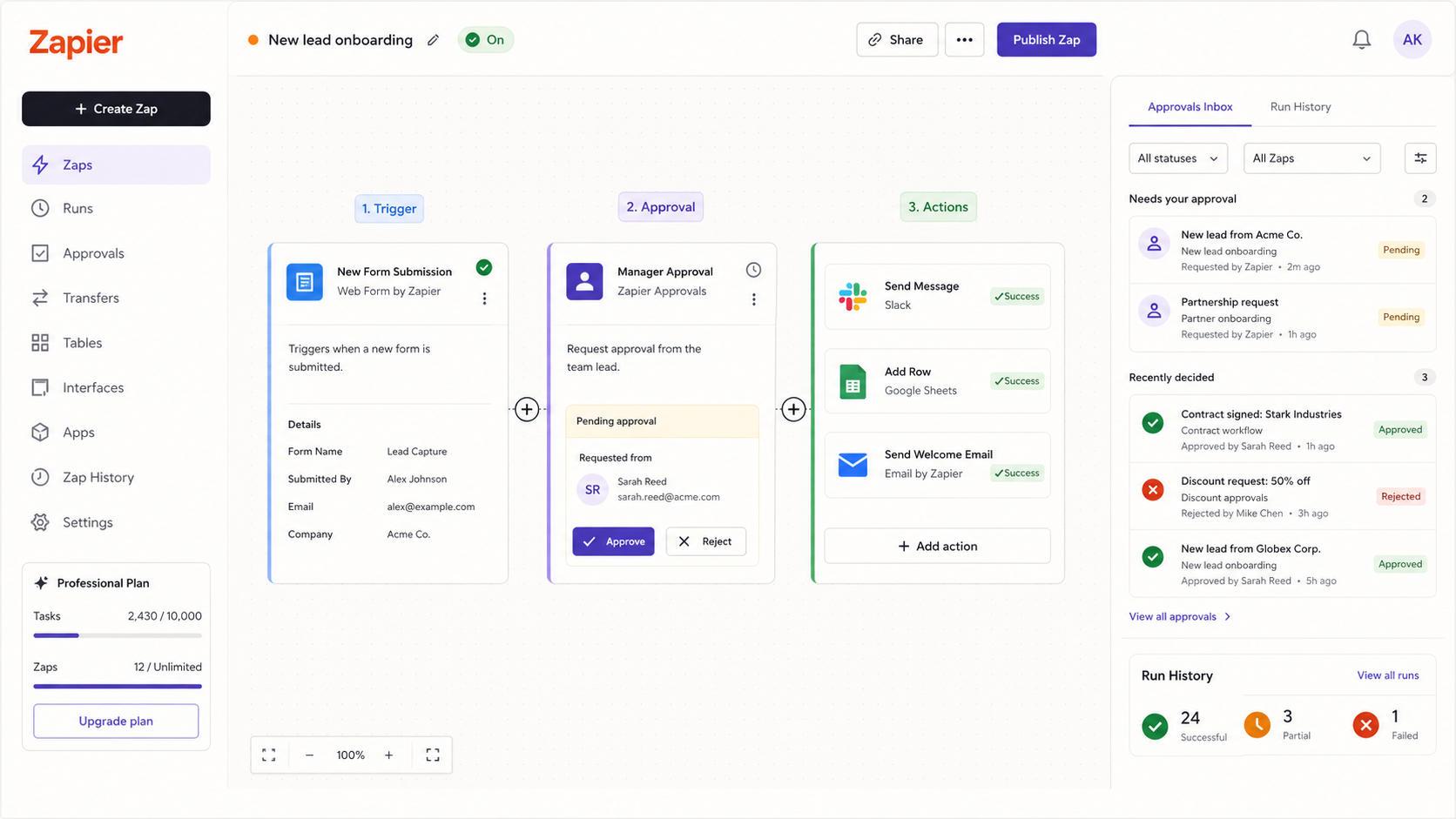
Zapier’s approval workflow automation can monitor folders, sales orders, or application submissions, then trigger standardized approval processes. Its approval process automation can collect, route, and track approval requests, notify the right people, and log submissions in connected systems. (Zapier)
This is useful when the approval is part of a lightweight automation. For example, a form submission can create a task, send a Slack notification, update a spreadsheet, or send an email after approval.
Zapier is not usually the right choice when approvers need a rich internal workspace with database records, document previews, comments, audit trails, and custom role-based actions. But it is useful for connecting approval-related events across SaaS tools.
Best for: simple approval automations between apps.
Choose Zapier if:
- the approval workflow is simple
- you mainly need to connect SaaS tools
- the process starts from a form, folder, or app trigger
- you do not need a custom internal approval interface
Main tradeoff: Zapier is excellent for automation glue, but it is not a full workflow approval software interface for complex operational processes.
8. Microsoft Power Automate
Microsoft Power Automate is best for approval workflows inside the Microsoft ecosystem.
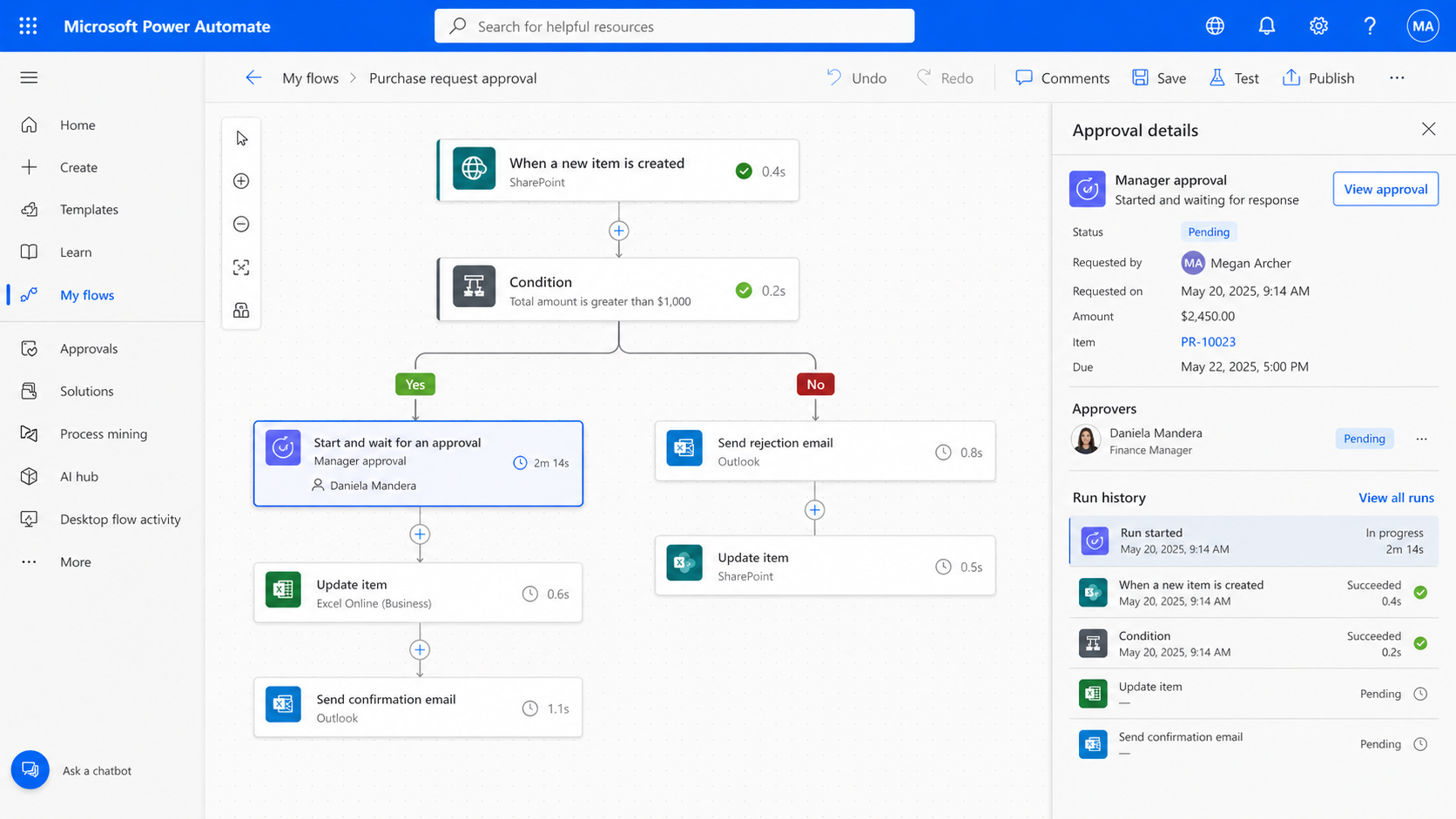
It is especially relevant for teams using Microsoft 365, Outlook, Teams, SharePoint, Dynamics 365, and related tools. Microsoft’s documentation says approval workflows can be created by adding the “Approvals - Start and wait for an approval” action to a flow, and gives examples such as document approvals for invoices, work orders, and sales quotations, as well as process approvals for vacation requests, overtime work, and travel plans. (Microsoft Learn)
Power Automate is a strong choice if the approval process already lives around Microsoft documents, SharePoint lists, Outlook notifications, or Teams collaboration.
Best for: Microsoft-first approval workflows.
Choose Microsoft Power Automate if:
- your company already uses Microsoft 365 heavily
- approvals happen around SharePoint, Outlook, or Teams
- you need document or process approvals inside Microsoft tools
- IT already manages Microsoft workflow automation
Main tradeoff: Power Automate is powerful inside the Microsoft ecosystem, but teams that need a more custom internal app experience across multiple databases and external systems may prefer UI Bakery.
Workflow approval software examples
Invoice approval workflow
A vendor invoice comes in. Finance reviews the vendor, amount, purchase order, attached documents, due date, and payment terms. The system routes the invoice to the right approver based on department or amount. The approver can approve, reject, request changes, or escalate.
This is one of the clearest use cases for UI Bakery because invoice approvals often require both structured workflow and real business data. A finance team can start with the invoice approval dashboard, then customize fields, approval rules, comments, audit history, and integrations.
Support refund approval workflow
A support agent requests a refund. The approver needs to see the customer profile, order history, support ticket, refund amount, reason, and policy rules. Small refunds may be approved by a team lead. Larger refunds may require finance or operations approval.
Sales discount approval workflow
A sales rep requests a discount for a deal. The workflow checks deal size, margin, region, contract terms, account type, and discount percentage. Larger discounts may require approval from sales leadership or finance.
A sales team can use this pattern to build a deal desk approval app connected to CRM and pricing data. This is closely related to the operational workflows described for sales teams.
Marketing budget approval workflow
A marketing team requests budget for a campaign, event, asset, or experiment. The approver reviews the campaign goal, channel, estimated spend, expected impact, timeline, and past performance.
For marketing teams, workflow approval software is most useful when it connects planning, requests, spend tracking, and reporting. A custom app built around marketing operations workflows can be more useful than a generic approval checklist.
Data access approval workflow
A team member requests access to a dataset, customer record, internal file, warehouse table, or operational system. The approver reviews the requester’s role, purpose, department, and sensitivity level. Approved access is logged and can trigger follow-up actions.
For teams working with warehouse data, a custom internal tool similar to Snowflake Admin can help expose operational data safely while keeping approvals and actions controlled.
File review or asset approval workflow
Some workflows revolve around files rather than records. For example, legal teams may review documents, marketing teams may approve assets, and operations teams may manage files attached to vendors, customers, or projects.
In those cases, an app pattern like S3 Explorer can help teams build internal workflows around file browsing, review, approval, and access control.
How to choose the right workflow approval software
Start with the workflow, not the tool.
Ask these questions before choosing a platform:
- What exactly is being approved?
- Who submits the request?
- Who reviews it?
- Who approves it?
- What business data does the approver need to see?
- What rules decide the approval path?
- What happens after approval?
- Does the workflow need an audit trail?
- Does the team need a custom interface?
- Does the approval process need to connect to databases, APIs, CRMs, ERPs, warehouses, or file storage?
If the approval process is simple and task-based, a tool like Monday.com or Zapier may be enough.
If the process is formal, enterprise-wide, or document-heavy, Nintex, ProcessMaker, Kissflow, or Pipefy may be a better fit.
If the approval workflow needs to operate on real business data through a custom interface, UI Bakery is often the stronger option. This is especially true when approvals are part of a broader internal tools strategy rather than a standalone workflow.
Teams comparing internal app platforms can also look at broader resources such as Retool alternatives and best platforms for building internal tools, because workflow approvals often become one part of a larger operational system.
Why UI Bakery is often the better fit for custom workflow approval software
UI Bakery is not only a workflow approval software tool. It is a platform for building internal tools and business apps.
That difference matters.
Many approval tools can route requests between people. But approval workflows inside real businesses often require more than routing. They need:
- data from databases and APIs
- documents and file previews
- custom business rules
- role-based permissions
- approval history
- dashboards for managers
- actions that update records after approval
- integrations with CRMs, ERPs, warehouses, and internal services
- interfaces designed around the exact workflow
UI Bakery fits these cases because teams can build custom approval apps on top of live data.
In practice, this means a team can build a workflow approval app that works the way the business actually operates. A finance app can show invoice data, vendor records, documents, approval history, and payment actions. A support app can show tickets, customer records, refund history, and escalation paths. A sales app can show CRM data, discounts, deal stages, and margin checks.
This is where UI Bakery is different from tools that only automate approval steps. It lets teams turn approval workflows into usable internal software.
Final recommendation
The best workflow approval software in 2026 depends on the type of approval process your team needs.
- Choose Monday.com or Zapier if the workflow is simple, task-based, and mostly about notifications or status tracking.
- Choose Kissflow, Pipefy, ProcessMaker, or Nintex if you need structured workflow management, business process automation, or enterprise approval routing.
- Choose Microsoft Power Automate if your approval workflows live mostly inside Microsoft 365, SharePoint, Outlook, or Teams.
- Choose UI Bakery if your workflow approval software needs to become a real internal app connected to your data, permissions, dashboards, and business logic.
For many teams, this is the practical difference:
A generic workflow tool helps you move approvals forward.
UI Bakery helps you build the internal approval system your team actually needs.
Next step
Planning a HIPAA-sensitive internal app?
Use the checklist above to map data flow, roles, audit events, vendors, and deployment decisions before the first production workflow ships.
Healthcare operations example
Action Behavior Centers scaled internal operations across clinics with UI Bakery
For a real operational example, review UI Bakery customer stories and healthcare operations patterns.
5,000+users supported in the customer story
400+clinics mentioned in the case study
What is workflow approval software used for?
Workflow approval software is used to route requests, documents, records, or business decisions through the right people before they move forward. Common use cases include invoice approvals, purchase approvals, refund approvals, sales discount approvals, document reviews, access requests, and internal operations workflows.
How do teams choose the right workflow approval software?
Teams should map the workflow first. Define what is being approved, who submits it, who reviews it, what data is needed, what rules determine the approval path, and what happens after approval. Simple workflows may only need a task board or automation tool. More complex workflows often need a custom internal app connected to business data.
What features matter most in workflow approval software?
The most important features are approval routing, request forms, conditional logic, notifications, comments, audit history, permissions, integrations, dashboards, and approve/reject/escalate actions. For operational teams, data integration and interface flexibility are especially important.
Is workflow approval software different from workflow automation software?
Yes, although they overlap. Workflow automation software focuses on automating tasks and processes. Workflow approval software focuses specifically on decision points where a person or group must review, approve, reject, or escalate something before the workflow continues.
Can workflow approval software replace spreadsheets?
Yes. Many teams start with spreadsheet-based approval trackers and later replace them with structured web apps. A proper approval app can include request forms, statuses, permissions, comments, notifications, audit trails, and integrations with real business systems.
When is UI Bakery better than traditional workflow approval tools?
UI Bakery is better when approvals need to happen inside a custom internal app connected to databases, APIs, CRMs, warehouses, storage tools, or internal systems. It is especially useful for invoice approval dashboards, support refund approvals, sales discount workflows, procurement tools, data access approvals, and other operational workflows where context matters.





"The UI Bakery platform offers a cost-effective approach to creating applications. With UI Bakery, you can achieve your app development goals without breaking the bank."

"Before switching to UI Bakery we developed a number of apps within the Retool system. The Retool system was good but ultimately did not have the flexibility and feature sets that we required."
Check the Story