Replace spreadsheets
with internal apps
When a spreadsheet starts carrying approvals, permissions, reporting, handoffs, or business-critical decisions, it needs more structure than rows and formulas can safely provide. Upload a file to draft an app, then connect the workflow to the systems your team already uses.
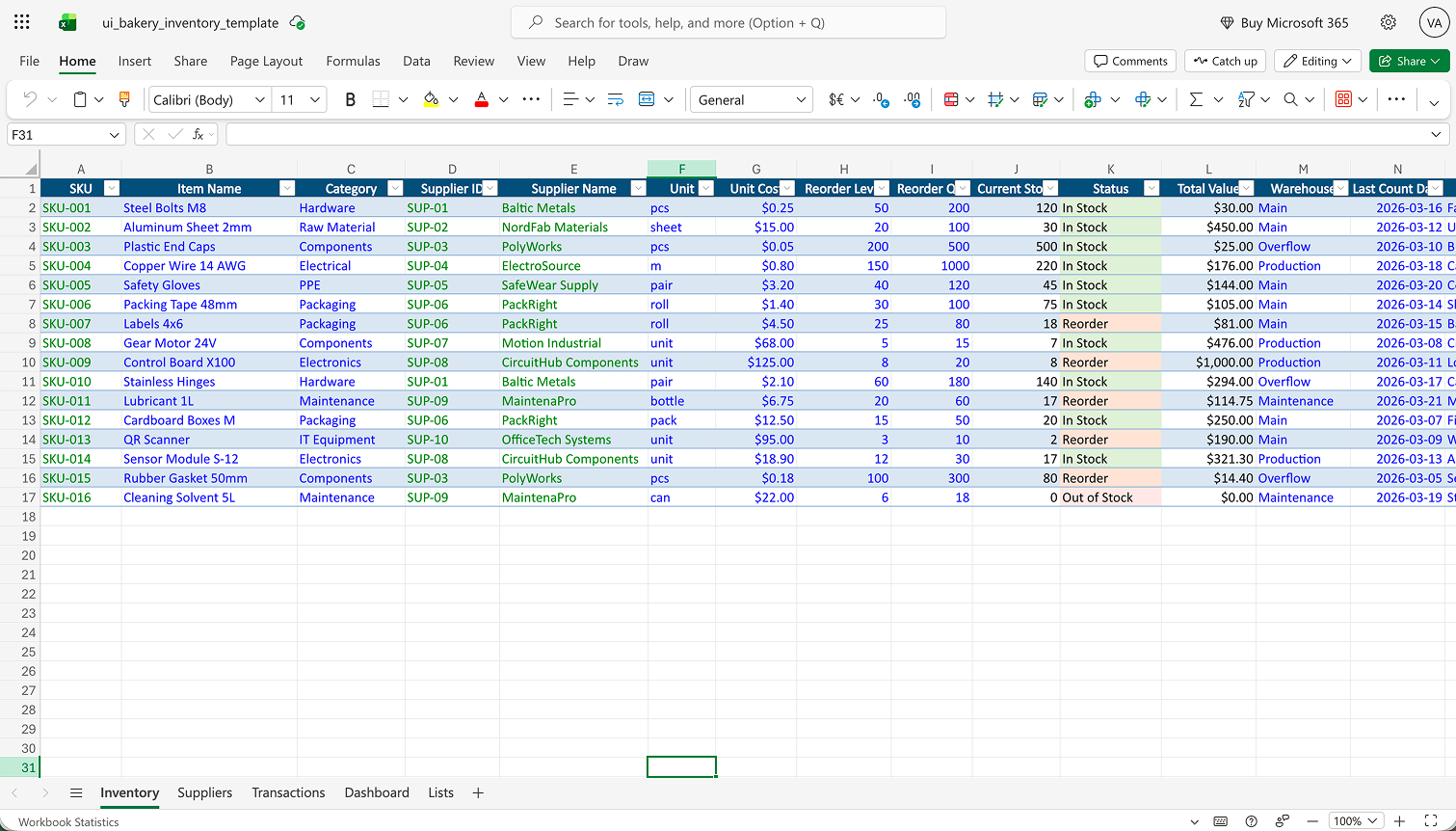
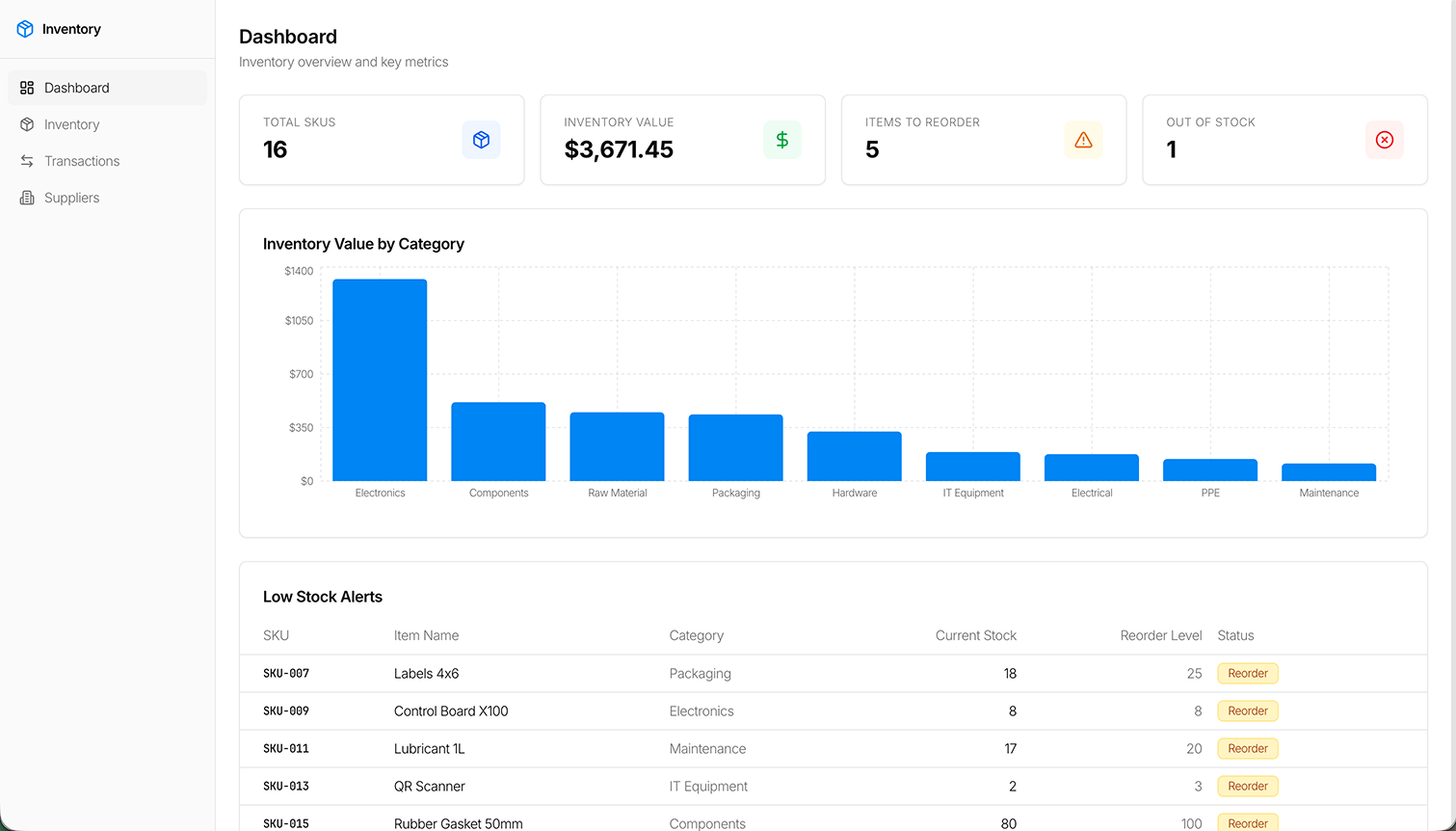
Example spreadsheet file and resulting app
Upload a spreadsheet and get a usable app structure with forms, logic, workflows, and clean UI.


When should you replace a spreadsheet with an internal app?
Replace a spreadsheet with an internal app when the file has become a system of record, workflow engine, approval process, reporting source, or operational handoff point. Keep a spreadsheet when the task is simple, temporary, owned by one person, and low risk. The goal is not to remove every spreadsheet. The goal is to preserve useful business logic while adding structure, permissions, validation, automation, and reliable reporting where the process has outgrown a file.
Use these signals to decide whether to keep the spreadsheet, automate around it, add an app interface, or replace it with a governed internal app.
| Signal | What it means | Recommended next step |
|---|---|---|
| More than one team edits the file | Ownership, status, and permissions are becoming hard to control. | Add an internal app interface with roles and structured forms. |
| Data is copied between spreadsheets and systems | The spreadsheet is acting as integration glue. | Connect the app to Google Sheets, databases, APIs, Salesforce, or BigQuery. |
| Comments, colors, or tabs represent workflow status | A workflow engine is hiding inside freeform cells. | Use explicit states, assignments, approvals, and notifications. |
| Permissions are hard to manage | The file is serving users with different access needs. | Add role-based access, scoped views, and safer edit paths. |
| Reporting depends on manual cleanup | Leadership decisions may rely on fragile, stale, or duplicated data. | Move reporting to dashboards connected to live records. |
| The file breaks when formulas, columns, or macros change | Business logic is hidden inside a fragile file structure. | Move critical logic into validated workflows and maintainable app behavior. |
| The workflow is audited, regulated, or customer-impacting | The process needs traceability and stronger controls. | Replace the file with a governed internal app and validate compliance scope. |
| Leadership uses the file for forecasting or operational decisions | The spreadsheet is influencing planning, staffing, revenue, or service quality. | Connect data sources and create reliable operational dashboards. |
Keep it
Use a spreadsheet for a simple tracker with one owner, low risk, and a short life span.
Automate around it
Keep the spreadsheet when it is still useful, but remove manual notifications, imports, or exports.
Add an internal app interface
Let the spreadsheet or database remain a source while users work through forms, roles, dashboards, and actions.
Replace it
Move the workflow when it is business-critical, multi-user, permissioned, audited, or tied to multiple systems.
What changes when a spreadsheet becomes an app
Before
- Freeform edits
- Shared links and copied files
- Manual status updates
- Fragile formulas
- No clear ownership
- Reporting cleanup before every meeting
After
- Structured forms and validation
- Role-based access
- Workflow states and approvals
- Database/API-backed records
- Audit-friendly history
- Dashboards connected to live data
Spreadsheet workflows that are ready for internal apps
Approval workflows
Replace manual review columns with states, tasks, and notifications.
Compliance reviews
Collect structured inputs, preserve history, and generate review outputs.
Recruiting trackers
Capture custom fields, automate emails, and feed staffing forecasts.
Procurement workflows
Handle niche business rules that off-the-shelf tools do not model well.
Inventory and logistics
Connect operations data to dashboards, routes, and fulfillment steps.
Customer operations
Give support teams safe interfaces instead of direct spreadsheet or database edits.
How to turn a spreadsheet workflow into an internal app
1. Map the workflow
Identify users, decisions, approvals, formulas, dependencies, and reporting needs.
2. Decide what stays
Keep spreadsheet logic that is useful; remove duplicated files and manual workarounds.
3. Choose the data model
Use a database, API, Google Sheets connection, Salesforce, BigQuery, or another system of record.
4. Build the app interface
Add forms, tables, dashboards, filters, and workflow actions.
5. Add controls
Configure roles, permissions, environments, validation, and audit-friendly behavior.
6. Launch in phases
Move one workflow first, train users, compare output, and iterate before retiring the old file.
Why UI Bakery fits spreadsheet-to-app projects
Keep useful spreadsheet logic
Connect to Google Sheets when the spreadsheet remains part of the process.
Connect real systems
Build on top of databases, APIs, Salesforce, BigQuery, internal services, and third-party tools.
Draft with AI assistance
Use AI-assisted app generation to draft the first interface, then refine logic visually or with code.
Add governance
Use roles, environments, SSO, audit logs, custom domains, and self-hosted deployment where governance matters.
Proof: spreadsheets to production internal apps
Action Behavior Centers
Action Behavior Centers replaced dozens of disconnected spreadsheets with centralized internal apps across 400+ clinics and 5,000+ users. Their clinical case review app replaced a manual spreadsheet-based compliance workflow, while their recruiting tracker created structured data for staffing forecasts.
Qualifirst
Qualifirst moved from a patchwork of spreadsheets, Salesforce workflows, procurement tools, and custom development into 100+ internal apps built with UI Bakery. The team used UI Bakery to regain control over procurement, logistics, marketing asset workflows, and project planning.
Spreadsheet to app FAQ
What is a spreadsheet-to-app project?
It is the process of turning a spreadsheet-based workflow into an internal app with forms, permissions, validation, automation, dashboards, and connected data.
When should a spreadsheet become an internal app?
When the spreadsheet has become a system of record, approval queue, reporting source, operational handoff, or multi-user workflow that needs stronger controls.
Should every spreadsheet be replaced?
No. Keep simple, temporary, low-risk spreadsheets. Replace files that have become business-critical, multi-user, permissioned, audited, or tied to several systems.
Can UI Bakery connect to Google Sheets?
Yes. UI Bakery can connect to Google Sheets, and teams can also connect databases, APIs, Salesforce, BigQuery, and other services when the workflow needs a stronger backend.
Can I keep the spreadsheet as a data source?
Yes. Some teams keep Google Sheets as a familiar source while adding a safer app interface, then move to a database later if the workflow grows.
What is the first workflow to migrate?
Start with one workflow where users already follow repeatable steps, reporting matters, and manual spreadsheet cleanup creates visible operational drag.
How do internal apps reduce spreadsheet risk?
They add structured inputs, validation, roles, workflow states, audit-friendly history, and dashboards connected to controlled data sources.
Can AI help turn a spreadsheet into an app?
AI can help draft the first app structure and interface. Teams should still validate the data model, permissions, business logic, and rollout process before replacing the spreadsheet.