
Lab Orders Tracker

Overview
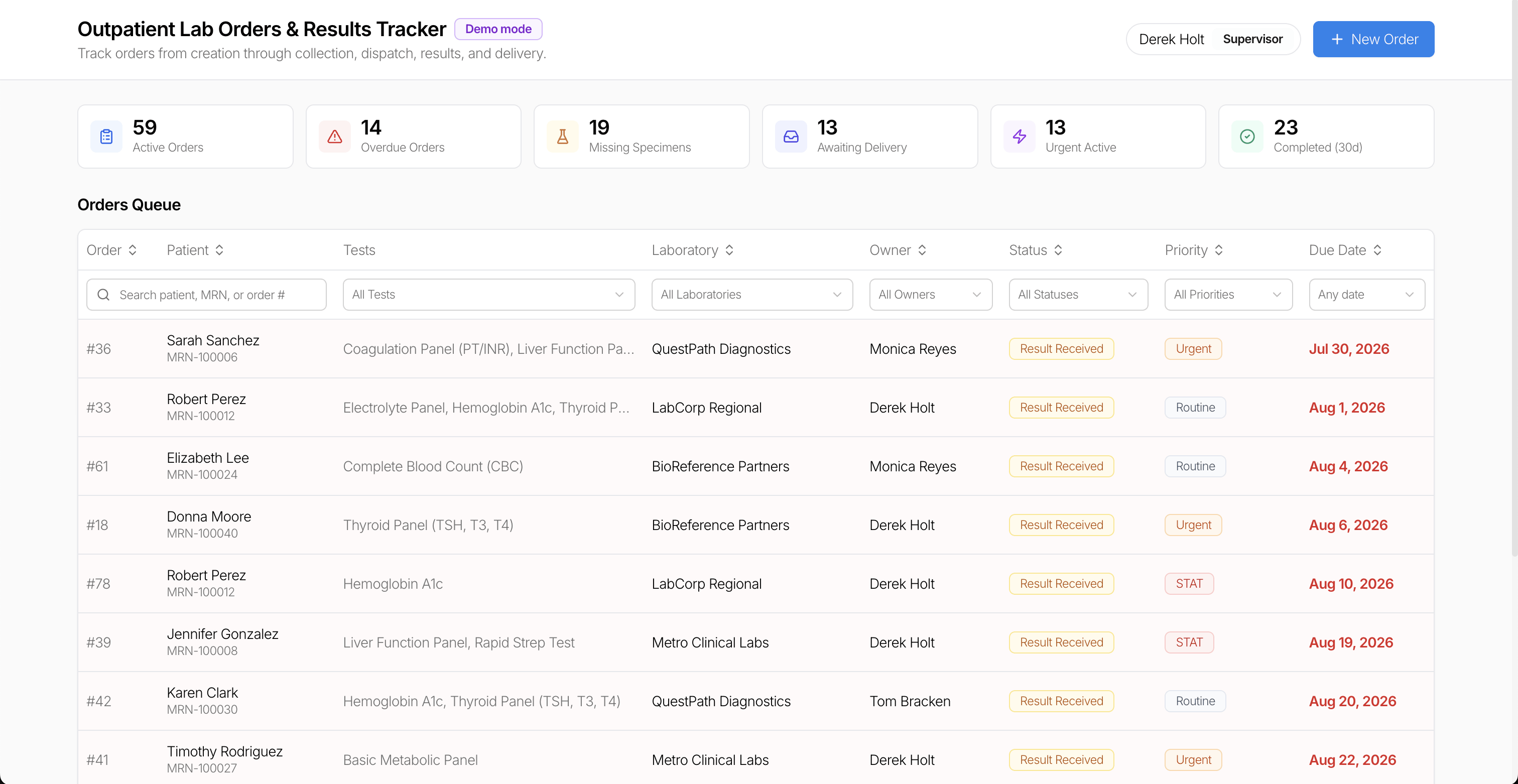
Keep outpatient lab work visible from the moment an order is created until its results reach the requesting clinician. The Lab Orders Tracker brings orders, patients, tests, laboratories, assigned staff, specimens, and results into one operational workspace.
Key Features
Searchable lab orders dashboard
Search by patient, medical record number, or order ID. Filter and sort the orders queue by tests, laboratory, owner, status, priority, and due date to find the work that needs attention.
Clear order status and priorities
Follow each order through specimen collection, dispatch, result receipt, and delivery. Distinguish routine, urgent, and STAT orders, and use summary cards to spot overdue orders, missing specimens, and results awaiting delivery.
Specimen and result tracking
Record collection and dispatch, review received results, and attach result files to the relevant order. The order detail view keeps tests, specimen information, results, and notes together.
Ownership and activity history
Assign or reassign an order owner and review the activity timeline to understand when an order changed status and what work has already been completed.
Use Cases
- Coordinating outpatient laboratory orders across staff and laboratories
- Tracking specimens and result delivery
- Finding overdue, urgent, or incomplete orders
- Replacing a spreadsheet-based lab order queue with a customizable internal app
Build Your Own Lab Order Workflow
Use this template as a starting point for lab order tracking. Adapt the fields, filters, statuses, and connected data sources to your clinic or laboratory workflow.


How the Lab Orders Tracker works
UI Bakery enables you to transform your data into dynamic internal tools, leveraging a combination of pre-built and customized components.
- To initiate, click "Sign up".
- Establish your organization and create app "From template"
- Customize your generated application visually by intuitively dragging and dropping components and crafting queries for your resources.
- Expand the capabilities of this application by linking to your personal database, kickstarting the development of robust internal tools.
Related healthcare templates

Related healthcare templates

"The UI Bakery platform offers a cost-effective approach to creating applications. With UI Bakery, you can achieve your app development goals without breaking the bank."
