
Hubspot to LinkedIn CSV Converter

Overview
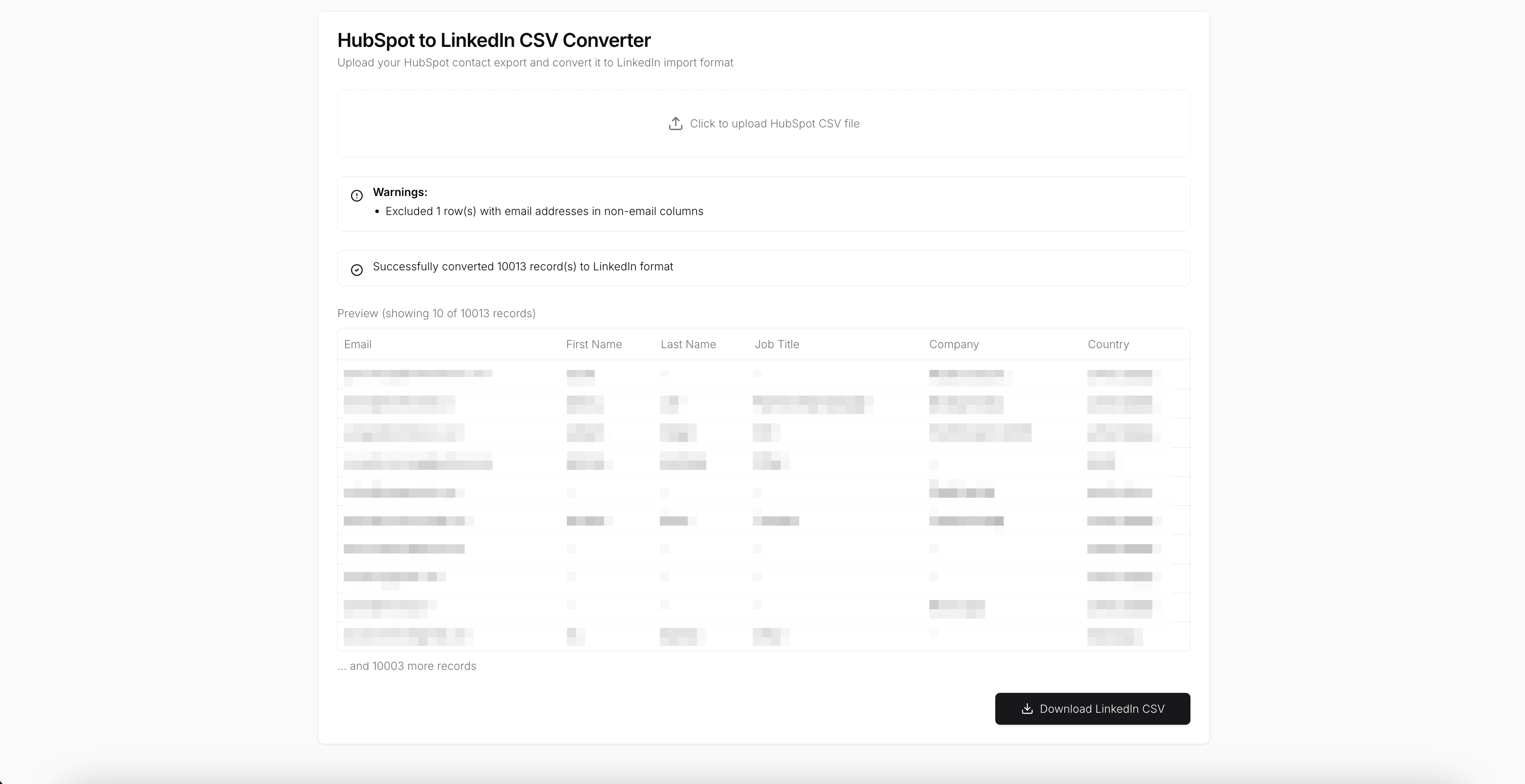
LinkedIn does not accept CSV files exported directly from HubSpot.The HubSpot to LinkedIn CSV Converter fixes this by transforming HubSpot contact exports into a LinkedIn-compatible format entirely in your browser. No servers, no uploads, and no data leaving your machine, so your customer data stays private and secure.
Key Features
Fixes HubSpot → LinkedIn Incompatibility
HubSpot CSV exports include columns and formats that LinkedIn rejects. The app automatically cleans and remaps the data so the file imports successfully on the first try.
100% In-Browser Processing
All parsing, validation, and conversion happens locally in your browser. No files are uploaded and no customer data is sent to any server.
Automatic Field Mapping
Convert HubSpot contact properties into LinkedIn-supported fields such as email, first name, last name, job title, company, and country without manual spreadsheet work.
Built-In Data Validation
Detect and exclude problematic rows, including email addresses in non-email columns. Clear warnings explain exactly what was skipped and why.
Preview Before Export
Review a preview of the converted contacts before downloading to ensure everything looks correct.
Handles Large Exports
Process thousands of HubSpot contacts in a single upload with consistent results.
LinkedIn-Ready CSV in One Click
Download a clean CSV that can be imported directly into LinkedIn without further edits.
Use Cases
- Importing HubSpot contacts into LinkedIn securely
- Running LinkedIn outreach from CRM data
- Fixing failed LinkedIn imports caused by HubSpot CSV exports
- Privacy-sensitive RevOps and sales workflows
- Teams that cannot upload customer data to third-party servers
Convert HubSpot CSVs Without Risk
Use this app to bridge the gap between HubSpot and LinkedIn while keeping all customer data on your device. Upload your CSV, convert it locally, and get a LinkedIn-ready file in minutes.

How the LinkedIn to Hubspot template works
UI Bakery enables you to transform your data into dynamic internal tools, leveraging a combination of pre-built and customized components.
- To initiate, click "Sign up".
- Establish your organization and create app "From template"
- Customize your generated application visually by intuitively dragging and dropping components and crafting queries for your resources.
- Expand the capabilities of this application by linking to your personal database, kickstarting the development of robust internal tools.
Related LinkedIn to Hubspot templates



Related LinkedIn to Hubspot templates

"The UI Bakery platform offers a cost-effective approach to creating applications. With UI Bakery, you can achieve your app development goals without breaking the bank."
