
AI Dashboard

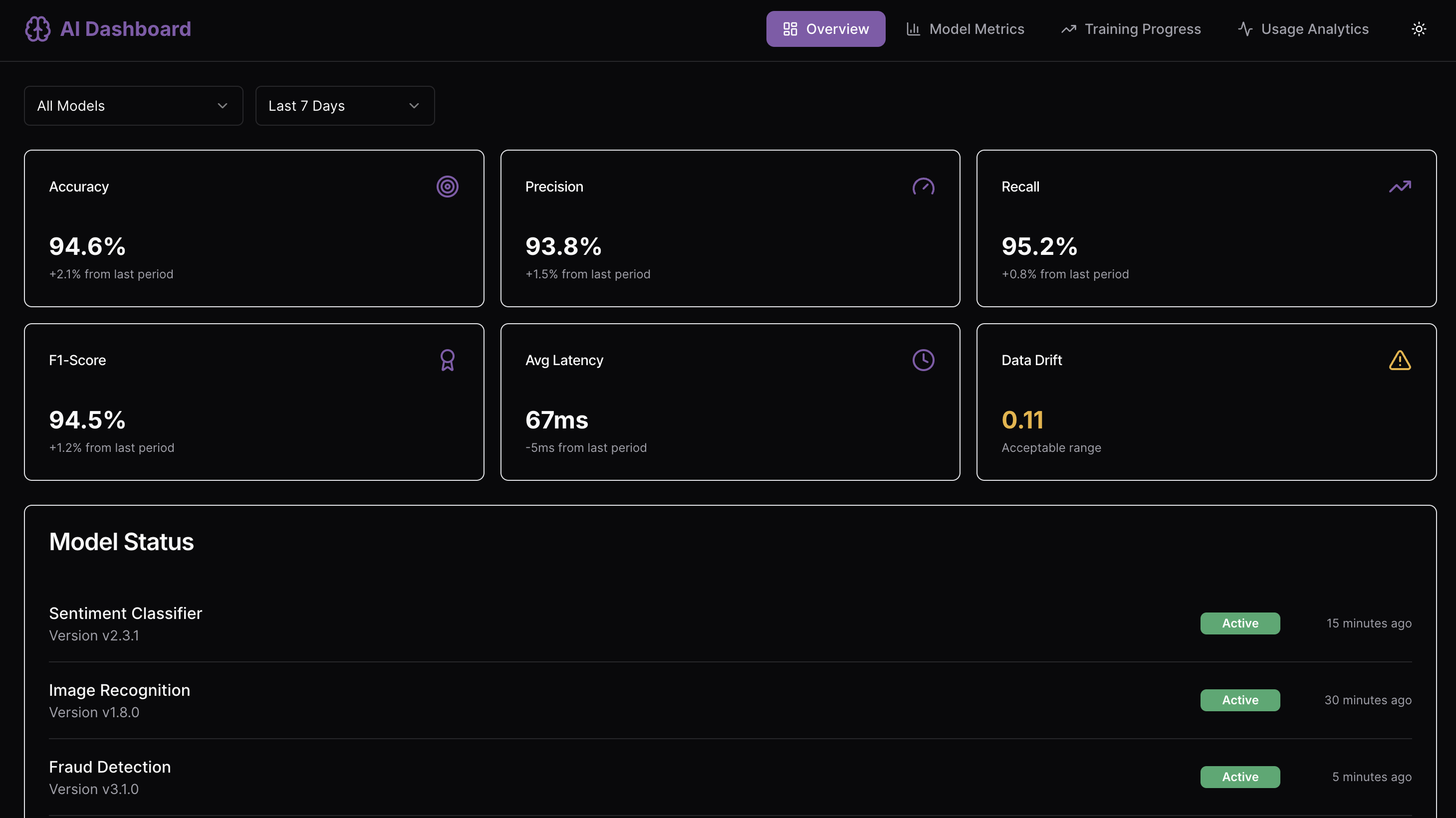
Overview
Monitor, analyze, and optimize AI model performance in real time.
The AI Dashboard centralizes model metrics, training progress, usage analytics, and performance insights in a responsive, intuitive interface - helping data scientists and ML engineers track AI efficiency, identify issues, and make data-driven improvements quickly.
Key Features
Real-Time Model Monitoring & Metrics
Track model KPIs such as accuracy, precision, recall, F1-score, latency, and data drift indicators. Gain immediate insights into model performance and potential bottlenecks with interactive dashboards.
Version Comparison & Error Analysis
Compare different model versions, evaluate confusion matrices, and monitor error distributions to identify areas for improvement and optimize AI workflows.
Training Progress & Hyperparameter Tracking
Visualize ongoing training jobs, epochs, loss curves, and completion rates. Access detailed hyperparameter settings to understand model behavior during training.
Usage Analytics & Resource Monitoring
Monitor API calls, model load, and resource utilization. Analyze high-demand models, detect bottlenecks, and ensure infrastructure efficiency.
Alerts & Notifications
Receive timely updates about anomalies, degraded model performance, or significant changes in metrics to enable proactive decision-making.
Use Cases
- AI model performance monitoring for ML engineering teams
- Tracking training & inference efficiency across multiple models
- Resource utilization and anomaly detection dashboards
- Centralized performance insights for data science operations
Start Building Your Own AI Dashboard
Use this AI Dashboard template as a foundation to create a fully custom AI monitoring platform. Connect live model metrics, visualize training progress, monitor usage analytics, and set alerts tailored to your AI workflows with UI Bakery’s low-code tools.
How AI Dashboard template works?
UI Bakery enables you to transform your data into dynamic internal tools, leveraging a combination of pre-built and customized components.
- To initiate, click "Sign up".
- Establish your organization and create app "From template"
- Customize your generated application visually by intuitively dragging and dropping components and crafting queries for your resources.
- Expand the capabilities of this application by linking to your personal database, kickstarting the development of robust internal tools.
Related AI Dashboard templates



Related AI Dashboard templates

"The UI Bakery platform offers a cost-effective approach to creating applications. With UI Bakery, you can achieve your app development goals without breaking the bank."
