

Windsurf vs Cursor Pricing (2026): Plans, Costs, and Key Differences

Updated:
March 9, 2026
AI coding assistants like Windsurf and Cursor offer multiple pricing tiers depending on usage limits, AI model access, and team features. In 2026, both platforms provide free plans for experimentation and paid tiers designed for developers, teams, and enterprises that rely heavily on AI-assisted coding. This guide compares Windsurf vs Cursor pricing to help you understand the differences in plans, usage limits, and overall value.
🪁 Windsurf Pricing Overview

Windsurf uses a credit-based pricing model designed for developers, teams, and enterprises that rely on AI-assisted coding. The platform provides both free access and paid tiers with increasing prompt credits, premium AI model access, and collaboration features.
Free Plan: $0/month
A great entry point for individual developers getting started with Windsurf.
- 25 prompt credits/month
Across leading models (OpenAI, Claude, Gemini, xAI, and more) - Basic model access
- Fast Context trial access
- Unlimited tab completions
- Unlimited inline edits
- Windsurf app previews
Pro Plan: $15/month
Ideal for individual developers who need access to premium models and higher usage.
- 2-week free trial with 100 credits
- 500 prompt credits/month after trial
- All premium models
- SWE-1.5 model
- Full Fast Context access
- Add-on credits available at $10 / 250 credits
Teams Plan: $30/user/month
Built for teams that need shared usage, visibility, and collaboration features.
- 500 prompt credits/user/month
- Add-on credits available for purchase
- Windsurf Reviews
- Centralized billing
- Admin dashboard with analytics
- Priority support
- Automated zero data retention
- SSO available for +$10/user/month
Enterprise Plan: Let’s talk
Designed for organizations requiring advanced security and access control.
- Everything in Teams, plus:
- 1,000 prompt credits/user/month
- Add-on credits available for purchase
- Role-Based Access Control (RBAC)
- SSO and advanced access control features
- Highest priority support (200+ users)
- Dedicated account management
⌨️ Cursor Pricing Overview
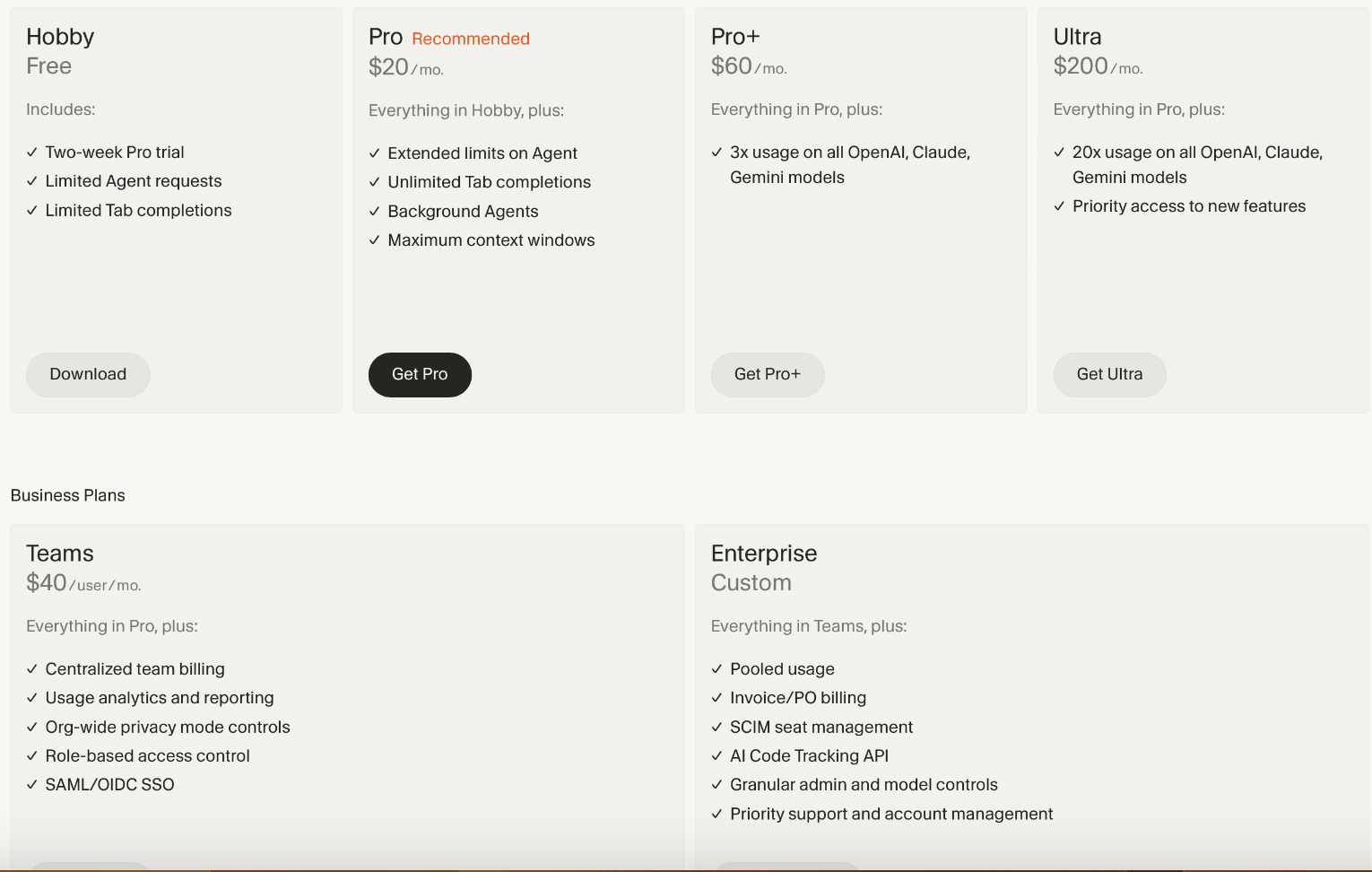
Cursor uses a straightforward pricing structure designed primarily for developers who want deep AI integration inside their coding environment. Its plans focus on usage limits, agent capabilities, and access to advanced AI models.
Hobby Plan: Free
Perfect for casual users or initial experimentation.
- Pro two-week trial
- Limited agent requests
- Limited tab completions
Pro Plan: $20/month
Designed for active developers who need greater productivity and extensive usage limits.
- Extended agent limits
- Unlimited tab completions
- Access to Background Agents & Bug Bot
- Maximum context windows for improved results
Pro +:
- Everything in Pro +
- 3x usage on all OpenAI, Claude and Gemini moels
Ultra Plan: $200/month
For power users or businesses that heavily depend on AI-driven workflows.
- 20x usage on all leading models (OpenAI, Claude, Gemini)
- Priority access to new features and updates
Teams Plan: $40/user/month
- Centralized billing
- Usage analytics and reporting
- Role-based access control
Enterprise Plan: per request
💡 Key Factors for Decision-Making
When deciding between Windsurf and Cursor, consider these key aspects:
1. Team Collaboration & Admin Control
- Windsurf offers explicit team-centric plans with advanced collaboration and administrative features.
- Cursor’s individual-focused pricing might limit teams' flexibility unless opting for the highest-priced plan.
2. Usage Limits and Flexibility
- Cursor's Ultra plan offers massive resource allocation but at a steep price jump from their Pro tier.
- Windsurf provides more nuanced and incremental pricing, helping teams scale without abrupt cost increases.
3. Enterprise-Grade Features
- Windsurf clearly caters to enterprise users, emphasizing RBAC, SSO, volume discounts, and hybrid deployment.
- Cursor’s top-tier "Ultra" targets extensive individual use but doesn't highlight enterprise security or RBAC prominently
🎯 Final Thoughts: Which Tool Should You Choose?
- Choose Windsurf if: You're looking for transparent team and enterprise-level pricing, flexible scaling, and robust collaborative tools.
- Choose Cursor if: You're an individual power user or a small developer team focusing intensely on AI-assisted coding tasks and willing to pay premium rates for top-tier usage.
FAQ
How much does Windsurf cost in 2026?
Windsurf offers a free plan with limited prompt credits and a Pro plan starting at $15 per month. Team plans cost $30 per user per month, while enterprise pricing is custom.
How much does Cursor cost in 2026?
Cursor provides a free Hobby plan and a Pro plan starting at $20 per month. Its Ultra plan costs $200 per month for heavy AI usage, and team pricing starts at $40 per user per month.
Is Windsurf cheaper than Cursor?
For individual developers, Windsurf is slightly cheaper with its $15 Pro plan compared to Cursor’s $20 Pro plan. However, the best value depends on how many AI credits and features you need.
Which tool is better for teams: Windsurf or Cursor?
Windsurf offers stronger team-oriented pricing and collaboration features, while Cursor is often preferred by individual developers focused on AI-assisted coding.
Do Windsurf and Cursor support enterprise features?
Yes. Both tools offer enterprise plans with features such as centralized billing, admin controls, and advanced security options.
Next step
Planning a HIPAA-sensitive internal app?
Use the checklist above to map data flow, roles, audit events, vendors, and deployment decisions before the first production workflow ships.
Healthcare operations example
Action Behavior Centers scaled internal operations across clinics with UI Bakery
For a real operational example, review UI Bakery customer stories and healthcare operations patterns.
5,000+users supported in the customer story
400+clinics mentioned in the case study




"The UI Bakery platform offers a cost-effective approach to creating applications. With UI Bakery, you can achieve your app development goals without breaking the bank."

"Before switching to UI Bakery we developed a number of apps within the Retool system. The Retool system was good but ultimately did not have the flexibility and feature sets that we required."
Check the Story