

Vertex AI Agent Builder: 2026 guide to Google's enterprise AI agent platform

Updated:
April 25, 2026
Vertex AI Agent Builder is Google Cloud's enterprise platform for building, deploying, and governing production AI agents — now part of the rebranded Gemini Enterprise Agent Platform announced at Cloud Next 2026. It bundles a code-first development kit (ADK), a low-code visual builder (Agent Studio), 200+ foundation models including Gemini and Claude, a managed runtime (Agent Engine), persistent memory, and enterprise governance into a single pay-as-you-go platform. It's the right choice for organizations running complex multi-agent systems on Google Cloud, but overkill for teams that just need an internal tool with some AI baked in.
If you've been tracking Google Cloud's AI roadmap over the past two years, you've watched Vertex AI Agent Builder evolve from a no-code chatbot tool into one of the most ambitious enterprise agent platforms on the market. And as of April 2026, it has a new name and a much bigger scope.
This guide walks through what Vertex AI Agent Builder actually is, how it works, what it costs, and where it fits compared to lighter-weight alternatives. We'll also cover the recent rebrand to Gemini Enterprise Agent Platform, what's changed in 2026, and which use cases the platform handles well versus where teams tend to hit friction.
What is Vertex AI Agent Builder?
Vertex AI Agent Builder is Google Cloud's platform for building, deploying, and governing production-grade AI agents. It's not a single product so much as a suite — a collection of services that cover the full agent lifecycle, from prototyping to scaling to monitoring agents in production.
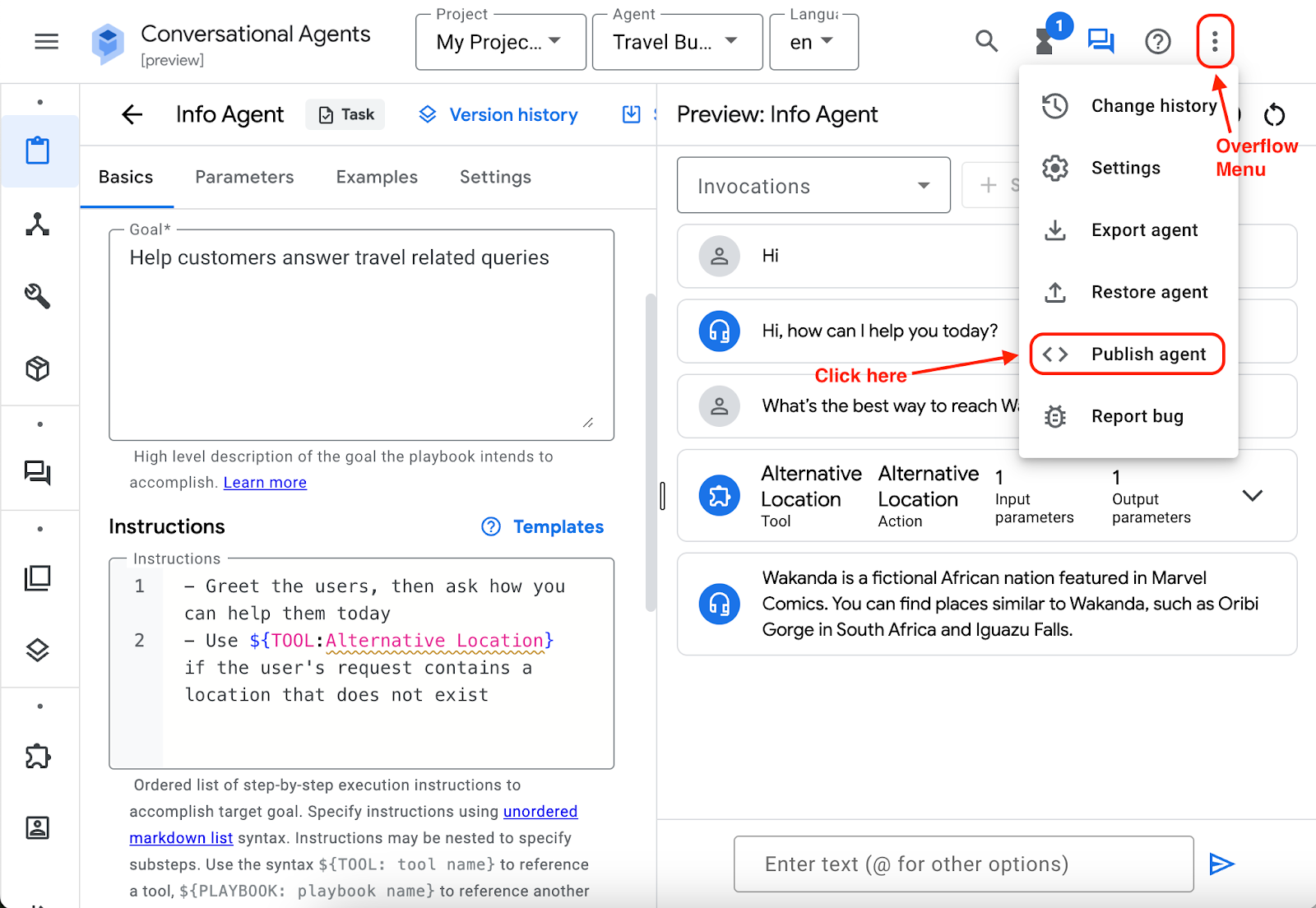
The platform was originally launched in April 2024 as a way to help businesses build conversational AI agents grounded in their own data. In April 2024, Google Cloud introduced Vertex AI Agent Builder, a tool that lets you create AI-powered conversational agents without writing any code. Since then, it has expanded well beyond chatbots. The current version supports complex multi-agent systems that can reason, call tools, query databases, and operate across multiple sessions with persistent memory.
At a high level, Vertex AI Agent Builder bundles together:
- Agent Development Kit (ADK) — an open-source, code-first framework for building agents in Python, Go, Java, or TypeScript
- Agent Studio — a low-code visual canvas for designing agents without writing code
- Agent Garden — a library of prebuilt agent templates for common use cases
- Model Garden — access to 200+ foundation models including Gemini, Claude, Gemma, and Llama
- Agent Engine — the managed runtime that handles deployment, scaling, sessions, and memory
- Agent Identity, Agent Gateway, and Model Armor — security and governance layers
The pitch is that you can prototype an agent in Agent Studio, harden it in ADK, deploy it on Agent Engine, and govern it at scale — all without leaving Google Cloud.
Vertex AI Agent Builder overview: the four pillars
Google organizes the platform around four functions: build, scale, govern, and optimize. This structure makes more sense once you understand that running one agent is easy — running hundreds of agents reliably across an enterprise is hard. The platform is built around that second problem.
Build
This is where most developers start. You have two main paths:
- Agent Studio is the low-code option. It's a visual interface where you can design agent reasoning loops, connect data sources, and test prompts using natural language. Agent Designer (Preview) is a low-code visual designer that lets you design and test your agent. Experiment with your agent in Agent Designer before transitioning development to code using Agent Development Kit. Good for product managers, business users, and anyone who wants to prototype quickly.
- Agent Development Kit (ADK) is the code-first option. It's a modular framework that gives you precise control over agent behavior, tool use, and orchestration logic. Since Agent Builder's public inception earlier this year, we've seen tremendous traction with components such as our Python Agent Development Kit (ADK), which has been downloaded over 7 million times. ADK is model-agnostic — you can use it with Gemini, Claude, open models, or anything else — and it deploys to any container or Kubernetes environment.
The ADK also ships with a graph-based framework for orchestrating multiple agents. Think of it like a workflow engine: you can define a "supervisor" agent that routes tasks to specialized sub-agents, each with their own tools and prompts.
Scale
Agent Engine handles the production side. It's a managed runtime that takes care of the infrastructure most teams don't want to build themselves: autoscaling, sub-second cold starts, session management, and long-running execution.
Two features are worth calling out specifically:
- Sessions manage state within a single conversation
- Memory Bank gives agents persistent memory that carries across conversations
Memory Bank in particular has become a major selling point for production agents. Payhawk uses Vertex AI Agent Builder to transform agents into financial assistants that truly 'know' our customers. Leveraging Memory Bank, we moved from stateless interactions to long-term context retention, allowing agents to recall user constraints and historical patterns with continuity. Without persistent memory, every conversation starts from zero. With it, an agent can remember a user's preferences, past decisions, and ongoing context — which is what makes the difference between a clever demo and a useful product.
Govern
This is the layer most consumer-grade agent tools don't have. It includes:
- Agent Identity — every agent gets a unique cryptographic ID for access control and auditing
- Agent Gateway — a central enforcement point for tool calls, authentication, and policies
- Model Armor — runtime threat detection, including protection against prompt injection
- Cloud API Registry — administrators can curate which tools are available to which developers
The governance pieces matter when you're moving from "we have one agent helping the support team" to "we have fifty agents touching customer data across twelve departments." That's the transition Google is trying to own.
Optimize
The newer additions cover evaluation and observability: agent performance dashboards, multi-turn auto-raters for measuring quality, online evaluation for live traffic, and the Unified Trace Viewer for debugging agent reasoning paths.
Vertex AI Agent Builder pricing
Pricing is one of the more confusing parts of the platform, partly because it has several different billable components and partly because the rates have changed multiple times in the past year. Here's the current state.
The platform uses a pay-as-you-go model with no flat subscription fee. You pay for what you use across several dimensions.
Agent Engine Runtime (the environment your agent lives in) is billed on compute consumption:
- vCPU: Starting December 16, 2025, the rate is $0.0864 per vCPU-hour
- Memory: $0.0090 per GB-hour
- Code execution (sandboxed Python): same vCPU and memory rates, billed starting January 28, 2026
Sessions and Memory Bank are now generally available and billed separately. Starting January 28, 2026, stored session events and "memories" will cost $0.25 per 1,000 events or memories.
Vertex AI Search (if your agent uses it for retrieval or grounding) is priced per query:
- Standard Search: $1.50 per 1,000 queries
- Enterprise Search with generative answers: $4.00 per 1,000 queries
- Conversational queries: $6.00 per 1,000 requests
Foundation models are billed separately based on the model you choose. Gemini 3 Pro, Gemini 3.1 Flash, Claude on Vertex, and the rest of Model Garden each have their own per-token pricing. This is usually the largest line item for production agents.
Data storage for indexing typically runs around $1.00 per GB per month.
What gets cheap is the free tier. Vertex AI Express Mode: You can use core tools like Vertex AI Studio and Agent Builder with limited quotas (up to 10 agent engines, 90 days of usage) without enabling billing. New Google Cloud customers also get $300 in free credits valid for 90 days, and Vertex AI Search includes 10,000 free queries per month.
What can get expensive is the long tail. A small business running one agent on a single vCPU for ten hours might only spend a few cents. A production deployment with thousands of memory entries, heavy search usage, and Gemini 3 Pro powering reasoning can easily run into thousands per month. The Gartner reviews are blunt about this: it has a complex pricing structure is one of the most common complaints from customers.
The pricing also assumes you're committed to Google Cloud. If your data already lives in BigQuery and your team uses Workspace, the unit economics work out. If you're paying just to use Agent Builder and pulling data from elsewhere, the math gets less favorable.
Vertex AI Agent Builder news: the 2026 rebrand
The biggest development of 2026 happened just this week. At Google Cloud Next 2026 in Las Vegas, Google unveiled major changes in its core AI platform. The big news: Vertex AI has been rebranded and expanded as the Gemini Enterprise Agent Platform.
This isn't just a name change. It's a consolidation. Google rebranded and consolidated its AI platform at Cloud Next 2026, renaming Vertex AI to the Gemini Enterprise Agent Platform and absorbing Agentspace into a unified Gemini Enterprise product.
Practically, this means a few things:
- Everything that was Vertex AI is now part of Gemini Enterprise Agent Platform
- All future Vertex AI roadmap work will ship through the new platform
- Agentspace (Google's employee-facing AI assistant) is now part of the same product family
- The Agent2Agent (A2A) protocol moved to production, allowing agents on different platforms to communicate
The strategic framing is worth noting. Google CEO Thomas Kurian framed the strategy as owning the entire stack—from custom silicon to the employee's inbox—while competitors, he argued, are "handing you the pieces, not the platform." Google is betting that enterprises don't want to stitch together five different vendors to deploy agents — they want one platform that handles models, infrastructure, governance, and distribution.
A few specific announcements worth tracking:
- Agent Studio got a major upgrade as a no-code visual builder
- ADK reached stable v1.0 across Python, Go, Java, and TypeScript
- Project Mariner, a web-browsing agent, became part of the platform
- MCP servers are now natively supported across Google Cloud services like BigQuery and Google Maps
- Anthropic's Claude Opus, Sonnet and Haiku are now first-class citizens in Model Garden alongside Gemini
For existing Vertex AI Agent Builder customers, there's no migration to do. The services are the same — they just live under a new umbrella.
Vertex AI Agent Builder documentation: how to actually start
The official Google Vertex AI Agent Builder documentation lives at cloud.google.com/vertex-ai/generative-ai/docs/agent-builder, and the canonical entry point now redirects to the Gemini Enterprise Agent Platform docs. The structure is roughly:
- Quickstart — set up a Google Cloud project, enable the Vertex AI API, install the gcloud CLI
- Agent Garden — browse prebuilt agent samples and one-click deploy them to your project
- ADK samples on GitHub — the adk-samples repository has reference implementations for common patterns
- Agent Starter Pack — a template collection with production-ready agent scaffolding
You can start building today with adk-samples on GitHub or on Vertex AI Agent Garden, a growing repository of curated agent samples, solutions, and tools designed to accelerate your development and support one-click deployment of your agents built with ADK.
The realistic learning curve is something most reviews mention. There was a steep learning curve for users. We required a super-user to be able to educate others on use cases and for use cases that worked on a large scale. If your team is already comfortable with Google Cloud, IAM, and BigQuery, you'll move fast. If not, expect to spend a few weeks getting up to speed before your first production agent.
When Vertex AI Agent Builder is the right choice
The platform shines for a specific kind of project. You want to choose Vertex AI Agent Builder when:
- You're already deeply invested in Google Cloud (BigQuery, Workspace, IAM)
- You need to handle complex multi-agent reasoning at enterprise scale
- Governance, audit trails, and security policies are non-negotiable
- You have engineering capacity to maintain a code-first platform
- You're building agents that need persistent memory across long sessions
- Your data volumes are large enough that Google's infrastructure makes economic sense
The platform is not the right fit when:
- You need a working internal tool tomorrow, not in six weeks
- Your team doesn't have dedicated AI engineers
- You want predictable monthly costs rather than variable per-token billing
- The "agent" you actually need is closer to a database app with an AI assist
- You're not committed to the Google Cloud ecosystem
That second list is where most small and mid-sized teams end up. Building agents from scratch on a platform like Vertex is genuinely powerful, but it's overkill for a lot of common needs — and that's where the alternatives matter.
When you don't need a full agent platform: UI Bakery
A common pattern we see: a team wants "an AI agent" but what they actually need is an internal tool with some AI-powered logic baked in. They don't need multi-agent orchestration or persistent memory banks. They need a working app that connects to their database, lets the right people do the right things, and ships this quarter.
UI Bakery takes a different approach to this problem. Instead of giving you a framework to build agents from scratch, UI Bakery is itself an AI Agent that builds applications. In 2026, it stands out as one of the few platforms where an AI Agent is the primary builder, not an accessory. Unlike data-first tools, UI Bakery starts from the concept of an application. Its AI Agent understands how internal tools are structured: databases, CRUD operations, permissions, workflows, and integrations.
You describe what you need in plain English, and the AI Agent generates a functional, data-connected application — including the UI, the queries, the integrations, and the permissions. Then you can extend it visually, edit the React code directly, or hand it off to engineering.
This works well for the kind of project where Vertex would be overkill. A few realistic examples:
Use case 1: A customer support escalation dashboard A support team needs a dashboard that pulls open tickets from Zendesk, joins them with customer LTV data from PostgreSQL, and lets supervisors reassign or escalate cases. With UI Bakery, you describe the dashboard and the AI Agent builds it — connected to both data sources, with the right filters and actions wired up. No agent orchestration framework required.
Use case 2: An inventory management tool with AI suggestions A warehouse team needs to track stock levels and get reorder recommendations. The AI Agent generates the CRUD interface against your inventory database, and you wire in an OpenAI or Gemini call to generate the recommendations. With UI Bakery's OpenAI integration, users can access powerful AI capabilities such as natural language processing, image recognition, and machine learning. The AI lives inside the app — it doesn't need its own platform.
Use case 3: A vendor invoice approval workflow Finance needs an app where approvers can review pending invoices, see vendor history, and approve or reject with comments. The AI Agent generates the table view, the detail panels, the approval logic, and the audit log against your existing database. RBAC is built in. The whole thing ships in a day.
Use case 4: An ops dashboard with custom React components A logistics team needs real-time route tracking with custom map components. UI Bakery's AI Agent generates the dashboard and connects the data, and you drop in any React component from npm for the parts that need bespoke visualization. Custom React components without restrictions. Use any React component from the internet and change code directly when granular customization is needed.
The shared pattern across these examples: the team needed an internal application with some intelligence in it, not a standalone autonomous agent. UI Bakery handles the application layer, including the AI parts, and gives you a working tool in minutes rather than weeks.
It's also worth noting where UI Bakery doesn't replace Vertex. If you're building genuinely autonomous multi-agent systems that reason across thousands of documents, run for hours unattended, and need to coordinate with other agents at scale — that's Vertex territory. UI Bakery is for the much larger category of "we need an internal app, and AI would make it better."
Vertex AI Agent Builder vs. the alternatives
A quick comparison to help you place these tools:
- Vertex AI Agent Builder (Gemini Enterprise Agent Platform) — Best for enterprise agentic systems on Google Cloud. Highest ceiling, steepest learning curve, most flexible. Variable pricing scales with usage.
- AWS Bedrock with Agents — Similar enterprise positioning on AWS. Strong if your data is already in AWS.
- Microsoft Copilot Studio — Best if you're a Microsoft 365 shop and want agents tightly integrated with Office and Teams.
- Anthropic Claude on its own API — Best for code-first developers who want maximum control over a single model and don't need a full platform.
- UI Bakery — Best for teams that need internal tools with AI capabilities, fast. Predictable pricing, opinionated about the application layer, AI Agent does the heavy lifting.
- Lindy, Voiceflow, Dialogflow — Best for conversational AI specifically (chatbots, voice agents) without needing the broader enterprise infrastructure.
The right choice depends mostly on what you're actually trying to build and where your data already lives.
The bottom line
Vertex AI Agent Builder — now part of Gemini Enterprise Agent Platform — is one of the most capable enterprise agent platforms in 2026. The recent rebrand at Cloud Next 2026 makes it clear that Google is going all-in on the agentic enterprise: full-stack control from custom silicon to the employee inbox, 200+ models in Model Garden, persistent memory, governance, and a code-first development experience that scales.
It's the right tool for organizations that need to build, govern, and scale autonomous agents across complex workflows. It's overkill for teams that just need a working internal tool by next Friday — and that's a much larger group than the platform is built for.
If you're in that second group, look at AI Agent–driven application builders like UI Bakery before you commit to a full agent platform. You'll ship faster, your costs will be predictable, and you might find that what you needed all along was a great internal tool with some AI built in — not a custom autonomous agent.
If you're in the first group, the platform is in the strongest shape it's been in since launch. The free $300 credit and Express Mode give you a 90-day window to validate it before committing budget. Start with the Agent Garden samples, deploy something simple to Agent Engine, and grow from there.
Next step
Planning a HIPAA-sensitive internal app?
Use the checklist above to map data flow, roles, audit events, vendors, and deployment decisions before the first production workflow ships.
Healthcare operations example
Action Behavior Centers scaled internal operations across clinics with UI Bakery
For a real operational example, review UI Bakery customer stories and healthcare operations patterns.
5,000+users supported in the customer story
400+clinics mentioned in the case study
What is Vertex AI Agent Builder used for?
Vertex AI Agent Builder is used to build, deploy, and govern production AI agents on Google Cloud. Common use cases include customer support agents with persistent memory, internal knowledge assistants grounded in company documents, multi-agent systems that coordinate across departments, and data analysis agents that query BigQuery and other Google Cloud sources. It's designed for enterprise deployments where governance, security, and scale matter.
Is Vertex AI Agent Builder the same as Gemini Enterprise Agent Platform?
Yes. At Google Cloud Next 2026, Google rebranded Vertex AI to Gemini Enterprise Agent Platform and consolidated it with Agentspace into a unified product. All Vertex AI Agent Builder services are now part of the new platform. Existing customers don't need to migrate — the services are the same, they just live under a new name.
How much does Vertex AI Agent Builder cost?
There's no flat subscription fee. You pay per use across several dimensions: Agent Engine runtime ($0.0864 per vCPU-hour and $0.0090 per GB-hour of memory), session/memory storage ($0.25 per 1,000 events), Vertex AI Search ($1.50–$6.00 per 1,000 queries depending on tier), and foundation model tokens (priced separately by model). New Google Cloud customers get $300 in free credits valid for 90 days, and Express Mode lets you try the platform without enabling billing.
What's the difference between Agent Studio and ADK?
Agent Studio is a low-code visual builder where you design agents through a UI — good for prototyping, product managers, and business users. The Agent Development Kit (ADK) is a code-first framework available in Python, Go, Java, and TypeScript that gives you precise control over agent behavior, tool use, and multi-agent orchestration. Most teams prototype in Agent Studio and then move to ADK for production.
Can Vertex AI Agent Builder use Claude or only Gemini?
Both. Model Garden gives you access to 200+ foundation models including Google's Gemini family, Anthropic's Claude (Opus, Sonnet, and Haiku are first-class citizens as of Cloud Next 2026), Meta's Llama, and Google's open Gemma models. ADK is model-agnostic, so you can swap models without rewriting your agent.
Do I need to be on Google Cloud to use Vertex AI Agent Builder?
Effectively, yes. The platform is tightly integrated with Google Cloud services like BigQuery, IAM, and Workspace, and the unit economics assume your data lives in the Google Cloud ecosystem. ADK itself is open source and can deploy to any Kubernetes environment, but you lose most of the platform's value (Agent Engine, Memory Bank, governance layers) if you're not running on Google Cloud.
When should I not use Vertex AI Agent Builder?
Skip it if you need a working internal tool fast, don't have dedicated AI engineers, want predictable monthly costs, aren't committed to Google Cloud, or if what you actually need is a database-backed app with some AI features rather than an autonomous agent. For those cases, AI-driven internal tool builders like UI Bakery, or simpler conversational platforms like Voiceflow, are usually a better fit.
What is Memory Bank in Vertex AI Agent Builder?
Memory Bank is Agent Engine's persistent memory feature. While Sessions handle state within a single conversation, Memory Bank carries context across conversations — letting an agent remember user preferences, past decisions, and ongoing context over time. It's billed at $0.25 per 1,000 stored memories and is one of the platform's main differentiators for production agents.
How long does it take to build a production agent on Vertex AI Agent Builder?
It varies. A simple agent built from an Agent Garden template can be deployed in a day. A custom multi-agent system with tool integrations, governance policies, and Memory Bank typically takes several weeks to a few months, depending on team experience with Google Cloud. Most reviews mention a meaningful learning curve — plan to spend a few weeks getting up to speed before your first production deployment.



"The UI Bakery platform offers a cost-effective approach to creating applications. With UI Bakery, you can achieve your app development goals without breaking the bank."

"Before switching to UI Bakery we developed a number of apps within the Retool system. The Retool system was good but ultimately did not have the flexibility and feature sets that we required."
Check the Story