

Invoice-to-payment reconciliation playbook

Updated:
October 1, 2026
Free Finance/Ops starter kit
Work out what needs checking before you chase a payment
Walk through partial payments, duplicate-looking receipts and missing references. Get the evidence, calculations and next steps in one practical review kit.
Get the playbook and workbookPDF guide + editable Excel workbook. Includes 12 invoice cases and their worked answers. No app setup required.
Inside the download
PDFWorked examples, review rules and handoff checklist
XLSXSynthetic source records, answer key and editable review sheets
Your reconciliation kit is ready
Start with the worked example
Read the playbook, then open the workbook to inspect the source rows and record your own review.
Reconciliation playbook
A practical PDF with calculations, exception rules and a checklist for handing cases to a reviewer.
Download PDFEditable workbook
The sample invoices and receipts, worked answers and space for your team's checks.
Download Excel workbookThese are standalone training materials. The workbook does not connect to accounting systems or automatically match new imports.
We also email the links. If you requested the kit before, the buttons here provide the current files. Questions? hello@uibakery.io.
A customer invoice says $1,000. Your payment export contains $600. The arithmetic is easy; deciding what to do next takes more care. Was it an installment, is another receipt missing, or has the payment already been applied?
This invoice-to-payment reconciliation guide is for accounts receivable and finance operations teams reviewing customer invoices against incoming payments. The examples use fictional records and a fixed September 26, 2026 cutoff. You can follow them without an application or a UI Bakery account.
Start invoice-to-payment reconciliation with the right balance
Write down whether the invoice export contains original invoice amounts or current open balances. Our sample uses original amounts. Subtracting all historical receipts from an open balance that already reflects those receipts would count the same payment twice.
Before doing the arithmetic, agree on the cutoff and which accounts and payment sources are included. Preserve the raw exports. Record the invoice ID, customer ID, currency, amount and due date; for receipts, keep the transaction ID, reference, settlement status and date. Check prior applications and adjustments in the source system before approving a proposed match.
Work through a partial payment
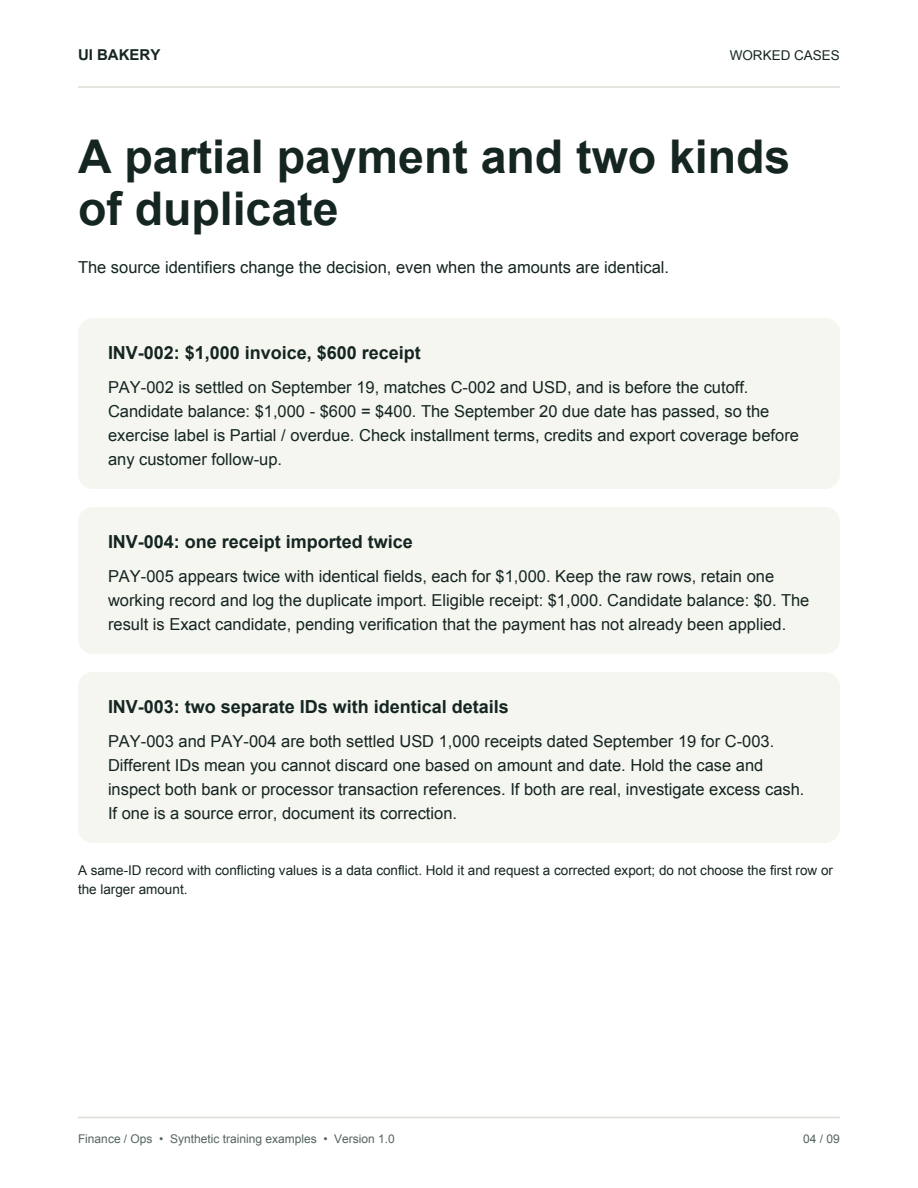
INV-002 is a $1,000 USD invoice for C-002, due September 20. PAY-002 is a settled $600 USD receipt dated September 19, with the same customer and invoice reference.
The $400 difference alone cannot tell you why the balance remains. A useful review note is: “INV-002 / PAY-002: $600 settled against an original $1,000 invoice. Candidate remainder $400 at September 26. Check the remittance advice and prior applications. Owner: AR reviewer. Status: awaiting evidence.”
Partial application is a normal accounting-system workflow: Microsoft documents applying part of a customer payment and distributing a payment across several ledger entries. The amount you choose still needs supporting evidence. Microsoft: applying customer payments.
Separate a repeated export row from a possible duplicate payment
Two rows can look identical for different reasons. In the sample, PAY-005 appears twice with the same ID and fields. The worked answer treats this as a repeated export record and counts the transaction once. With real data, confirm what the ID represents in the source before excluding a row from the working calculation; preserve both raw rows.
INV-003 has two different receipt IDs, PAY-003 and PAY-004, each for $1,000 on the same date. Keep both in view and hold the case. The matching amount does not establish whether there were two genuine receipts, a duplicated transaction or a source error.
Give each exception a specific next check
Why we included these cases
In an r/Accounting discussion, a poster describes missing remittance information and earlier payments applied to the oldest invoices, leaving the team unsure what had been paid. A separate r/excel question asks how to include installments in a payment dashboard without breaking its existing logic.
These are individual public accounts, not evidence of how common the problems are or endorsements of this kit. We used them to choose concrete training cases. The sample data and answers were authored for this guide; no customer results or time savings are claimed.
What you get in the download
The PDF explains the review sequence, works through the calculations and gives you a handoff checklist. The Excel workbook contains 12 synthetic invoices, 14 raw payment rows, worked results and editable review sheets. One repeated payment ID is intentional. One receipt has no invoice reference and remains a separate investigation case.
Try the partial-payment case first. Then compare the two duplicate-looking cases against the answer key. The workbook is a manual training aid with limited arithmetic formulas; it does not classify new imports or update your ledger. Have your finance process owner adapt the checks before using the sheets for operational work.
Next step
Planning a HIPAA-sensitive internal app?
Use the checklist above to map data flow, roles, audit events, vendors, and deployment decisions before the first production workflow ships.
Healthcare operations example
Action Behavior Centers scaled internal operations across clinics with UI Bakery
For a real operational example, review UI Bakery customer stories and healthcare operations patterns.
5,000+users supported in the customer story
400+clinics mentioned in the case study




"The UI Bakery platform offers a cost-effective approach to creating applications. With UI Bakery, you can achieve your app development goals without breaking the bank."

"Before switching to UI Bakery we developed a number of apps within the Retool system. The Retool system was good but ultimately did not have the flexibility and feature sets that we required."
Check the Story