
![Codeium vs Cursor: Which Is Better? Pricing, Speed, Features Compared [2026]](https://cdn.prod.website-files.com/6542d8f9e468531067fe9978/68cffd6c3117b13140dd34ed_Codeium%20vs%20cursor.jpg)
Codeium vs Cursor: Which Is Better? Pricing, Speed, Features Compared [2026]

Updated:
February 22, 2026
Codeium (now Windsurf) is the better choice if you want a free, lightweight AI assistant that works inside the editors you already use – VS Code, JetBrains, Vim/Neovim, and more. Cursor is the better choice if you want an AI-native IDE built for multi-file editing, background agents, and deep codebase awareness – and you're comfortable with usage-based pricing that can exceed the base subscription. For most solo developers on a budget, Windsurf's free tier is hard to beat. For teams that can standardize on one editor and need agentic workflows, Cursor delivers more power out of the box.
Tools overview
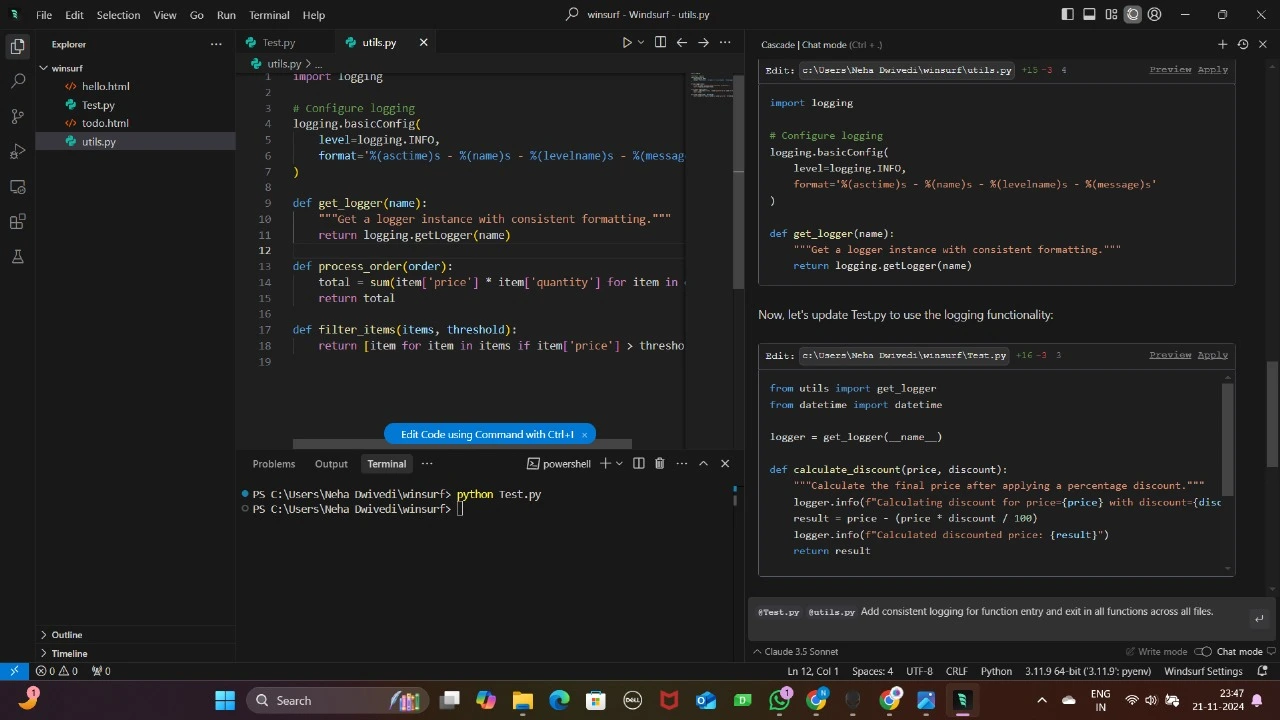
Codeium is now called Windsurf, it is a plug-in AI assistant that slots into your existing editor. You get fast autocomplete, in-editor chat, and broad IDE coverage, with a free-forever individual tier; teams can move up to paid plans or pursue enterprise deployment.
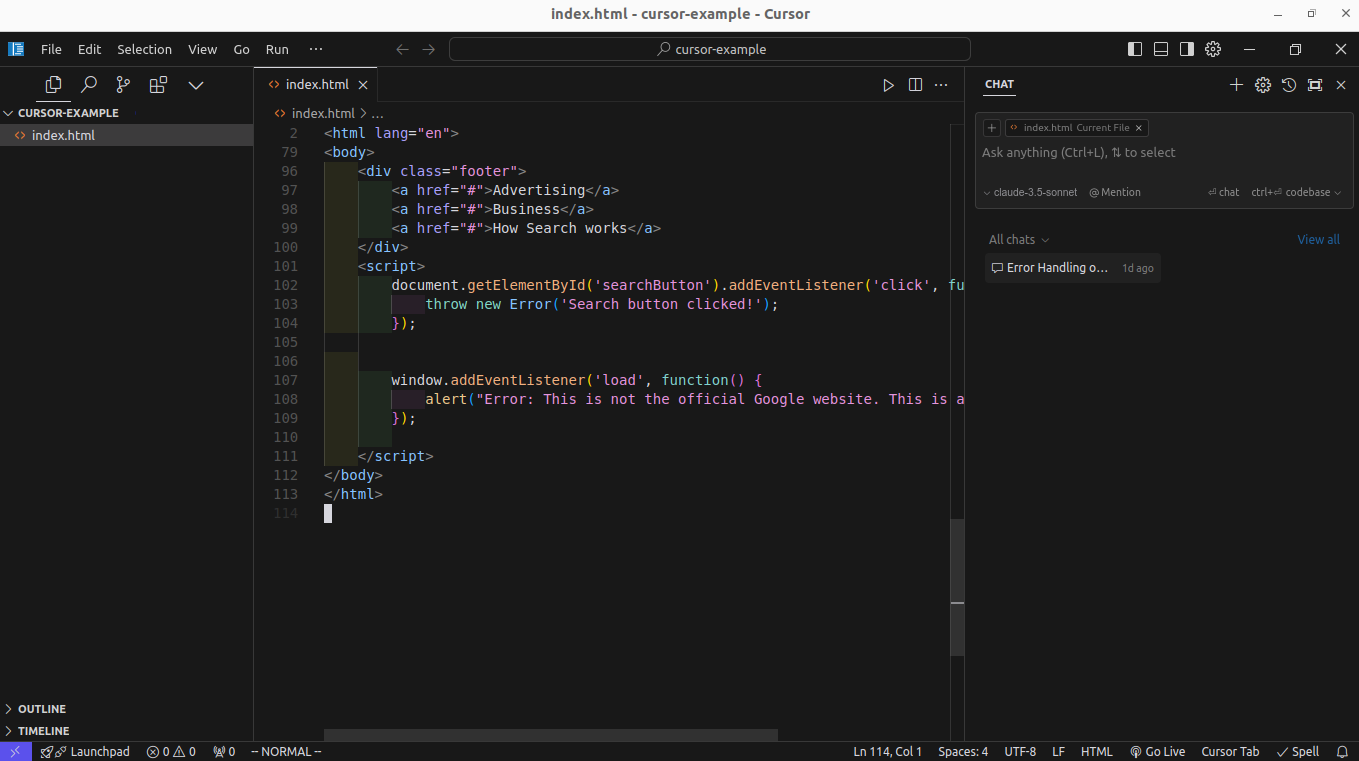
Cursor is an AI-centric fork of VS Code that treats AI as the primary workflow: whole-project edits, repo-aware refactors, background agents, and an optional Bugbot add-on for PR reviews. Cursor’s current pricing model mixes monthly plans with usage credit pools and at-cost overages for frontier models.
Day-to-day coding experience
Codeium allows you to stay in your current IDE. If your team is split across JetBrains, VS Code, and terminal editors, Codeium is the least disruptive path: install, index, and you’re getting inline suggestions and chat where you already work.
Cursor helps you to lean into an AI-first editor. Cursor’s loop is built around giving the model more context and permission to act: multi-file edits, background agents, and tight Git workflows. With Bugbot, you also get AI PR reviews that aim to catch logic/security issues early.
Context & scale
Codebase awareness. Both tools index your project for context, but Cursor's architecture makes large, cross-file transformations feel first-class – its Composer/Agent mode can plan and edit across dozens of files at once. Windsurf's Cascade engine is catching up fast, and its Codemaps feature gives strong context awareness on bigger codebases while letting you keep your editor muscle memory.
Team standardization. Cursor shines if you can standardize on one editor and want shared org controls and agent workflows. Windsurf shines when your team runs heterogeneous IDEs or you need plugin-level adoption with zero migration.
Pricing, limits, and the 2025 reality
Codeium (Windsurf): The free tier gives you 25 prompt credits per month – enough to evaluate the tool. Pro costs $15/month (500 credits), Teams $30/user/month, and Enterprise $60/user/month. All tiers include Cascade and Tab/Supercomplete. Deployment options range from cloud to hybrid to fully self-hosted.
Cursor: The free Hobby plan includes 2,000 completions and 50 slow premium requests. Pro costs $20/month and includes unlimited tab completions plus a dollar-credit pool for premium models (Claude, GPT-4o, Gemini). If you exceed the credit pool, you pay overages at the model's API rate – which means monthly costs can spike for heavy users. Pro+ ($60/month) and Ultra ($200/month) scale up agent capacity. Business plans start at $40/user/month with centralized billing and admin controls.
In June 2025, Cursor shifted from a fixed request-count model to usage-based credits, which sparked community backlash over unpredictable billing. Windsurf's pricing is currently more transparent and roughly 25% cheaper at every tier. For a full breakdown, see our Cursor AI pricing explained guide.
Privacy & security
Codeium (Windsurf): SOC 2 Type II-ready, with cloud, hybrid, and self-hosted deployment options. Zero Data Retention (ZDR) is enabled by default on enterprise plans. A strong pick for teams with strict compliance or air-gapped requirements.
Cursor: Enterprise and Business plans include SSO (SAML/OIDC), RBAC, pooled usage, and admin controls. The optional Bugbot add-on integrates at the PR level for code-review compliance. Cursor is cloud-only, which may require additional data-handling review for regulated codebases.
Best for
Choose Codeium (Windsurf) if you:
- Want to stay in your current IDE (VS Code, JetBrains, Vim/Neovim)
- Need a generous free tier for solo or budget-conscious development
- Require self-hosted or air-gapped deployment for enterprise compliance
- Work on a team that uses multiple editors
Choose Cursor if you:
- Want the deepest multi-file editing and agentic workflows available today
- Are comfortable switching to Cursor's standalone editor
- Need background agents, Bugbot PR reviews, and whole-project context
- Can monitor usage to manage credit-based billing
For a deeper look at what Cursor can do, read our guide to Cursor AI.
UI Bakery’s AI App Generator as an alternative
If your goal isn’t “assist me while coding” but rather “ship a working internal tool quickly,” consider UI Bakery’s AI App Generator. The tool turns prompts into functional web apps (dashboards, admin panels, workflows) on a secure low-code platform, with a free tier for small teams and affordable paid seats – plus on-prem options for enterprises.
Bottom line
Codeium supercharges the editors you already use, while Cursor is an editor rethought around AI loops and agents. Codeium’s free individual plan is great for adoption, but Cursor’s credit-plus-overage model is predictable if you monitor usage.
If you need an app, not an assistant, UI Bakery’s AI App Generator may get you to a deployed internal tool faster than wiring everything by hand.
Next step
Planning a HIPAA-sensitive internal app?
Use the checklist above to map data flow, roles, audit events, vendors, and deployment decisions before the first production workflow ships.
Healthcare operations example
Action Behavior Centers scaled internal operations across clinics with UI Bakery
For a real operational example, review UI Bakery customer stories and healthcare operations patterns.
5,000+users supported in the customer story
400+clinics mentioned in the case study





"The UI Bakery platform offers a cost-effective approach to creating applications. With UI Bakery, you can achieve your app development goals without breaking the bank."

"Before switching to UI Bakery we developed a number of apps within the Retool system. The Retool system was good but ultimately did not have the flexibility and feature sets that we required."
Check the Story