

CodeGPT Pricing: Fluff-Free Breakdown

Updated:
November 28, 2025
CodeGPT is a model-agnostic AI coding assistant. It lets you pick your AI provider, retain control over data and billing, and still get powerful AI-driven code completion, debugging, and “AI pair-programming.” But as with any tool, the right plan can make all the difference.
In this article, we’ll break down CodeGPT’s pricing plans, highlight what each offers, and help you decide which fits your coding style.
Overview of CodeGPT plans
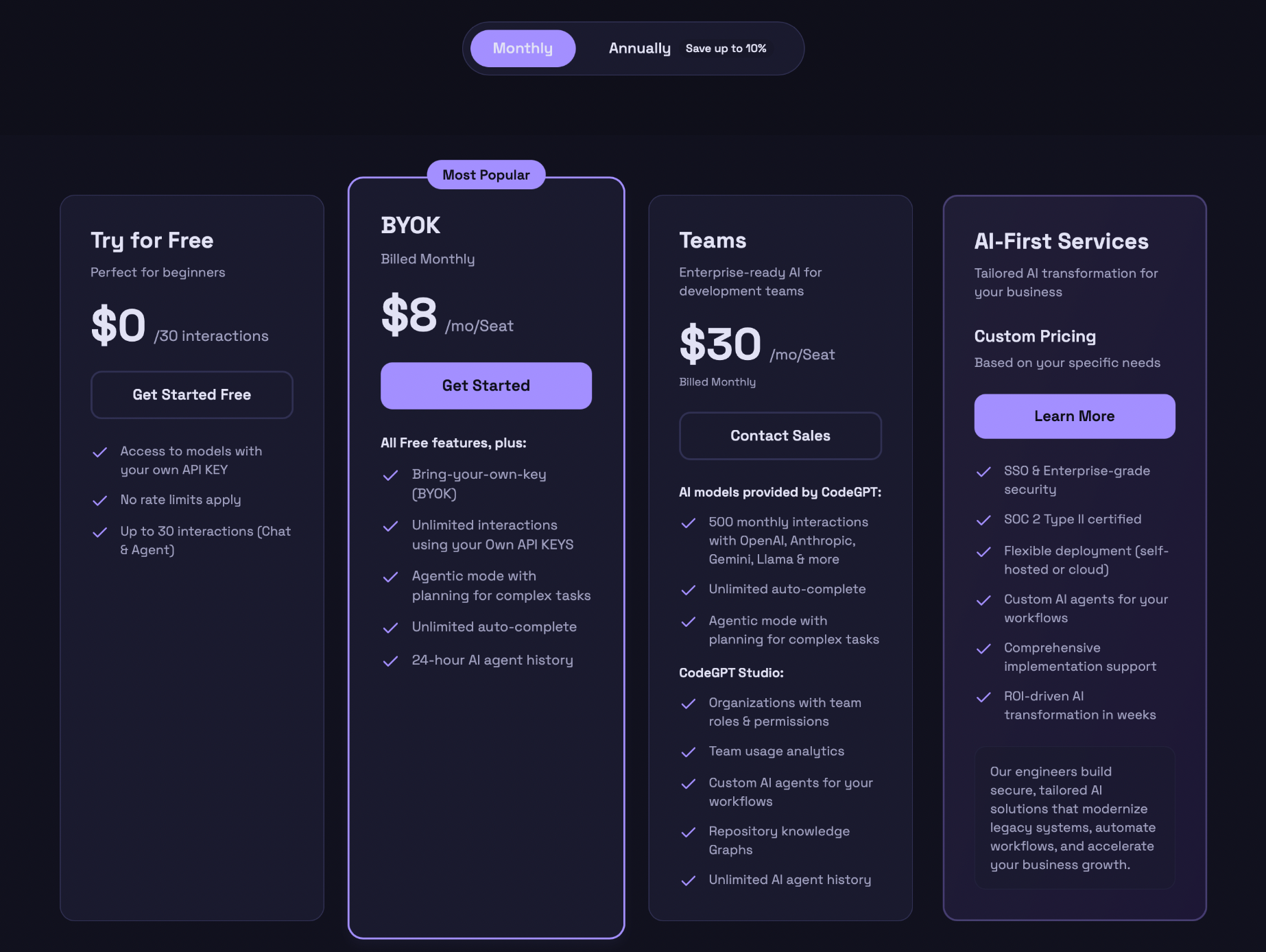
Free Plan – $0/month
The Free Plan is CodeGPT’s entry-level offering. It’s perfect if you’re curious about AI coding tools, learning, tinkering with small scripts, or just evaluating CodeGPT’s capabilities.
What you get:
- Access to CodeGPT using your own AI provider/API key, so you’re in control of which model you leverage.
- Up to 30 “interactions” per month. Interactions include chat-based queries or the use of agent features.
- Up to 200 code-completion (auto-complete) operations per month are helpful for small tasks, quick snippets, or experiments.
- Basic support for “agentic mode,” letting you trial the automated coding agent features.
- Data privacy by default – your code and interactions are excluded from any external AI training datasets.
Best for:
- Beginners, students, hobby projects.
- Developers curious about AI-assisted coding without a financial commitment.
- Those who want to experiment, learn, or check if CodeGPT fits their workflow.
BYOK plan (Bring-Your-Own-Key) – $8/mo/seat
The BYOK plan is tailored for individuals: solo developers, freelancers, or side-project maintainers who want consistent AI-assisted coding power without having to overpay for team-centric features.
What you get:
- All the perks of the Free Plan (API-key based model selection, privacy, etc.).
- Unlimited interactions (chat or agent), enabling frequent coding help, debugging cycles, or feature generation.
- Unlimited auto-complete suggestions.
- Full ‘agentic mode’ support, allowing CodeGPT to help with tasks such as refactoring, multi-file changes, and even project-wide adjustments.
- 24-hour agent history is helpful to track recent context or refer back to previous AI-assisted sessions.
- Flexibility: you remain free to pick or switch your AI provider/model according to your needs or budget.
- Privacy protections as standard.
Best for:
- Solo developers or freelancers working regularly with code.
- Side-project maintainers need frequent AI help.
- Developers who value flexibility and control over AI model choice and billing and plan to do consistent or heavy coding.
Teams plan – $30 /mo/seat
The Teams plan is designed for small-to-medium-sized development teams or agencies that want to leverage AI-assisted coding collaboratively with shared context, history, assistants, and project-wide organization.
What you get:
- Everything from BYOK: unlimited usage, auto-complete, agentic mode, privacy, and model-agnostic flexibility.
- Ability to create multiple custom AI assistants per project. Each is tailored to specific tasks or coding styles.
- Dedicated storage for context, codebase summaries, custom behavior definitions, or project documentation.
- “Graph” management lets you build and manage knowledge-maps of your codebase, documentation, and dependencies, giving AI agents a richer context for larger-scale projects.
- Unlimited team memberships under one plan that facilitates collaboration across your whole team.
- Long-term history retention of agent interactions is crucial for collaboration, audit trails, and shared understanding.
- Baseline usage allowances (interactions, token quota thresholds) with the possibility to scale as needed.
Best for:
- Small/medium dev teams, startups, and agencies working on collaborative projects.
- Projects requiring shared context, codebase-wide refactoring, or long-term maintenance.
- Teams that value organized workflows, documentation, and collaborative AI-assisted development.
All first services – not fixed (based on your specific needs)
The Enterprise plan is a custom, large-scale option suitable for organizations that require advanced security, compliance, and high scalability for AI-assisted development. The cost is customized based on your organization’s size, needs, and usage.
What you get:
- Enterprise-grade security, compliance, and data handling.
- Flexible deployment: you may use your own AI provider or even self-host CodeGPT to align with internal infrastructure and security policies.
- Custom AI-agent development, integrations, onboarding, and support designed to fit legacy codebases, industry-specific workflows, or large-scale architecture.
- Dedicated support, training, and possibly Service-Level Agreements (SLAs) that are helpful for teams with critical delivery timelines, compliance requirements, or custom toolchains.
- Scalability: handles large teams, many projects, high usage, and complex development workflows.
Best for:
- Large companies, enterprises, or organizations with strict security or compliance needs.
- Projects with large or legacy codebases requiring custom integrations or deep AI-assisted tooling.
- Teams needing support, training, and long-term maintainability for AI-assisted development.
How to choose the right plan?
- If you’re new to AI-assisted coding or just curious, the Free Plan is the best starting point. It’s a low-risk way to test the waters without paying anything.
- If you code solo or part-time and plan to use CodeGPT regularly – go for BYOK. It gives you unlimited usage and flexibility without overpaying for features you don’t need.
- If you’re part of a small or medium-sized team, collaborating on shared projects – the Teams Plan brings meaningful advantages: shared context, history, multiple assistants, and organizational features.
- If you’re part of a large company or working on enterprise-scale projects, or care deeply about security, compliance, custom tooling, or integration – the Enterprise Plan is worth a conversation with the vendor.
Bonus tool: UI Bakery AI Agent
If you handle backend logic, business logic, or heavy code using CodeGPT, you might want a simpler yet effective solution for internal tool building.
UI Bakery is an AI Agent that converts text prompts into fully working apps. You can also combine CodeGPT and UI Bakery together to have a full-stack, AI-assisted development flow. It’s an excellent combo for prototyping, building internal tools, or fast-tracking minimum viable products.
FAQ
1. Does the CodeGPT subscription include the cost of using AI like GPT-4?
No, the subscription covers the platform (interface, agent orchestration, storage, and collaboration). The cost of AI model usage (tokens) is billed separately by the AI provider whose API key you use.
2. Can I upgrade (or downgrade) my plan later?
Yes, you can start on Free or BYOK and upgrade to Teams or Enterprise later, if your needs grow.
3. If I use CodeGPT together with UI Bakery AI Agent, does it affect which CodeGPT pricing plan I should choose?
Yes, indirectly. If you’re combining CodeGPT for backend logic and UI Bakery AI Agent for rapid UI or internal tool development, you’ll likely generate more code, more iterations, and more agent interactions. In that case, the BYOK plan (for solo developers) or the Teams plan (for collaborative builds) will provide enough unlimited usage and flexibility. The Free plan might feel too restrictive if you're actively using both tools together.
4. For a small side project or hobby work, is a free plan often enough?
Frequently, yes. If you only need occasional code help, small scripts, or occasional debugging/auto-completion, Free Plan might suffice.
5. When does it make sense to consider a plan higher than free?
When you’re part of a large organization or team, have high security or compliance requirements, maintain large or legacy codebases, or need custom AI-agent integrations and support.
Next step
Planning a HIPAA-sensitive internal app?
Use the checklist above to map data flow, roles, audit events, vendors, and deployment decisions before the first production workflow ships.
Healthcare operations example
Action Behavior Centers scaled internal operations across clinics with UI Bakery
For a real operational example, review UI Bakery customer stories and healthcare operations patterns.
5,000+users supported in the customer story
400+clinics mentioned in the case study




"The UI Bakery platform offers a cost-effective approach to creating applications. With UI Bakery, you can achieve your app development goals without breaking the bank."

"Before switching to UI Bakery we developed a number of apps within the Retool system. The Retool system was good but ultimately did not have the flexibility and feature sets that we required."
Check the Story