

Supabase MCP: What It Is, How to Set It Up Safely, and Where UI Bakery Fits
%201.png)
Updated:
May 8, 2026
Supabase MCP usually refers to using Model Context Protocol servers with Supabase, so AI tools can interact with Supabase-backed data, APIs, or workflows. In practice, the term can mean two different things: building a custom MCP server that connects to Supabase, or using Supabase Auth and Edge Functions as part of an MCP implementation.
That distinction matters. Supabase’s current documentation says Supabase does not provide ready-made MCP server functionality, but it does provide guidance for building MCP servers that connect to a Supabase project and use Supabase Auth OAuth 2.1 capabilities. (Supabase)
So this Supabase MCP guide focuses on the practical question developers and teams actually have: how MCP fits with Supabase, how to approach implementation safely, and when you need a structured internal app or workflow layer around it.
What does “Supabase MCP” usually mean?
Model Context Protocol, or MCP, is a standard that lets AI agents and LLM tools connect to external tools, services, and data sources. If you need a deeper foundation, UI Bakery already has a guide explaining what MCP is.
In the Supabase context, MCP usually means giving an AI client controlled access to Supabase-backed capabilities, such as reading data, calling approved tools, triggering workflows, or interacting with project-specific resources.
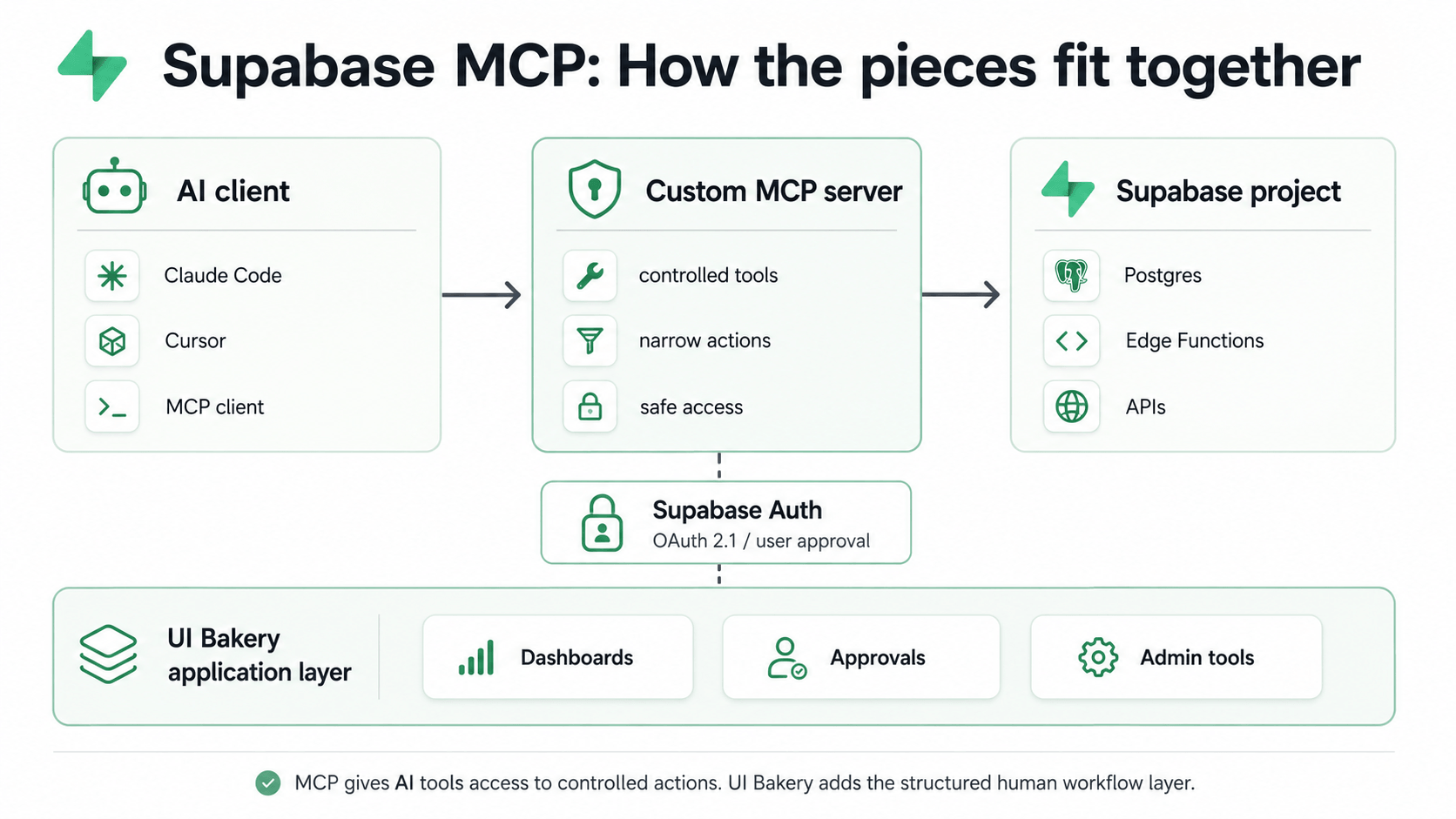
But “Supabase MCP” is not one single product category.
It can mean:
- A custom MCP server that connects to Supabase
- An MCP server deployed on Supabase Edge Functions
- An MCP server that uses Supabase Auth for OAuth-based authentication
- A workflow where an AI coding tool, agent, or IDE interacts with Supabase through MCP-compatible tools
This is why Supabase MCP implementation should be treated as an architecture decision, not just a quick integration checkbox.
Two different things people mean by Supabase MCP
1. Building an MCP server that connects to Supabase
The first meaning is the most direct one: you build your own MCP server, and that server connects to your Supabase project.
In this setup, the MCP server becomes the controlled tool layer between the AI client and your backend. The server defines what tools exist, what inputs they accept, what data they can access, and what actions they can perform.
For example, you might expose tools like:
- search customer records
- summarize recent support tickets
- fetch unpaid invoices
- check product inventory
- create a draft admin action
- prepare a SQL query for review
- trigger a safe read-only diagnostic workflow
The important part is that the AI client does not get unlimited direct access to your database. The MCP server should expose narrow, intentional tools.
Supabase documentation explains how MCP servers can connect to a Supabase project and use Supabase Auth’s OAuth 2.1 capabilities, including user approval, token handling, and Row Level Security behavior.
2. Building or deploying MCP servers on Supabase infrastructure
The second meaning is using Supabase infrastructure, especially Edge Functions, to run an MCP server.
Supabase has documentation for building an MCP server with mcp-lite, a lightweight TypeScript framework for MCP servers. The guide explains how to scaffold, develop, and deploy an MCP server using Supabase Edge Functions.
This is useful when you want your MCP server to live close to your Supabase backend and run as part of your existing Supabase-based architecture.
Supabase’s example highlights benefits such as direct database access, TypeScript support in Deno, global distribution, and deployment through Supabase Edge Functions.
What a Supabase MCP setup can do
A Supabase MCP setup can give AI tools a structured way to interact with data and workflows connected to your Supabase project.
Depending on how you build it, it can support use cases like:
- database exploration
- read-only data lookup
- support operations
- admin workflows
- internal reporting
- product operations
- data quality checks
- AI-assisted workflow execution
- developer tooling around Supabase projects
The exact capabilities depend on the tools you expose through the MCP server.
That is the key point: MCP is not magic database access. It is a protocol for exposing tools to AI clients. Your implementation determines whether those tools are safe, narrow, useful, or dangerously broad.
For teams that only need normal app connectivity, MCP may not be necessary at all. You can simply connect Supabase directly to UI Bakery and build internal tools on top of your Supabase data.
How Supabase Auth fits into MCP
Supabase Auth can be used to authenticate AI agents through your existing user base when you build MCP servers connected to Supabase.
According to Supabase’s MCP Authentication docs, this can support:
- OAuth 2.1 with PKCE
- automatic discovery by MCP clients
- dynamic client registration
- user authorization flows
- token exchange
- authenticated access to Supabase APIs
- Row Level Security policies applying to MCP clients (Supabase)
This matters because MCP access should not be treated as a single shared service token that bypasses your app’s permission model.
A better Supabase MCP implementation should answer:
- Who is the AI agent acting on behalf of?
- What can that user access?
- Which tools are available to this client?
- Which actions require explicit approval?
- Which actions are read-only?
- Which operations are blocked entirely?
Supabase docs recommend explicit user approval for MCP clients, including showing what the AI agent can access, displaying scopes, giving users a way to deny access, and allowing access to be revoked later. (Supabase)
How to set up Supabase MCP safely
A safe Supabase MCP setup starts with scope control.
Do not begin by exposing broad database access. Begin with specific, low-risk tools that solve a clear workflow problem.
For example, instead of giving an AI agent a generic “run SQL” tool, create tools like:
- find_customer_by_email
- get_recent_orders
- list_open_refunds
- summarize_account_activity
- prepare_update_for_review
This keeps the MCP server closer to an internal API layer and further away from an uncontrolled database console.
Use user-based authentication where possible
If your MCP server uses Supabase Auth, the AI client can authenticate through existing users instead of requiring a separate identity system. Supabase’s docs describe an OAuth flow where the MCP client discovers configuration, registers if needed, redirects the user for approval, exchanges tokens, and then makes authenticated requests.
This is useful because it lets your existing access model matter.
If your Supabase project already relies on Row Level Security, user-specific access is especially important. Supabase notes that RLS policies can apply to MCP clients when requests are made with Supabase Auth tokens.
Be careful with dynamic client registration
Dynamic client registration can make setup easier because MCP clients can register automatically. But it also increases the need for review and monitoring.
Supabase recommends requiring user approval, monitoring registered clients, and validating redirect URIs from trusted domains when dynamic registration is enabled. (Supabase)
For production use, this should not be treated as a “turn it on and forget it” feature.
Start with read-only workflows
For early Supabase MCP use cases, read-only access is usually safer.
Good first use cases include:
- asking questions about internal records
- summarizing operational data
- looking up customer or account context
- generating draft reports
- checking schema information
- preparing suggested actions for review
Write access should be introduced only when you have clear approval flows, audit logs, permission boundaries, and rollback plans.
Separate production and development access
Do not let experimental MCP workflows freely operate on production data.
A practical setup might include:
- local development MCP server
- staging Supabase project
- limited production tools
- read-only production access by default
- manual approval for sensitive writes
- logs for every agent-triggered action
This is especially important for teams building internal operations, finance, support, compliance, or healthcare-adjacent workflows.
Common Supabase MCP issues teams hit
Supabase MCP sounds simple at the architecture level, but teams often run into practical friction.
Auth setup can be confusing
OAuth discovery, redirect URLs, dynamic registration, and token exchange need to be configured correctly. Supabase’s troubleshooting section mentions issues such as OAuth discovery failures, dynamic registration failures, token exchange errors, and RLS policies blocking MCP access. (Supabase)
This does not mean MCP is broken. It means the setup touches identity, permissions, clients, and infrastructure at the same time.
MCP responses can become too large
If a tool returns too much database context, the AI client can become slower, more expensive, or less useful.
A good Supabase MCP tool should return the smallest useful result, not a full dump of everything the database can see.
For example, instead of returning every customer field, return only:
- customer ID
- name
- status
- relevant account flags
- last activity date
- specific records needed for the task
Multi-project access can create confusion
Many Supabase users have multiple projects: local, staging, production, test, demo, or client-specific environments.
Your MCP server should make project scope obvious and hard to misuse.
For production workflows, do not rely on naming conventions alone. Use explicit environment separation and tool restrictions.
Local development has edge cases
Supabase’s mcp-lite guide shows local development using Supabase CLI and an MCP endpoint served through Edge Functions. The local endpoint can then be tested with clients such as Claude Code, Claude Desktop, Cursor, or an MCP inspector. (Supabase)
This is powerful, but it also means developers need to understand their local Supabase setup, function routing, auth behavior, and MCP client configuration.
Supabase MCP examples
Here are practical Supabase MCP examples that make sense for developers and internal teams.
Example 1: Support assistant for Supabase-backed apps
A support team needs to investigate user issues without giving support agents direct database access.
An MCP server could expose tools like:
- look up user by email
- fetch subscription status
- list recent errors
- summarize recent activity
- prepare a support note
The AI client helps the support team reason through the case, but the MCP tools control what data can be accessed.
A UI Bakery layer could then turn this into a support dashboard with search, user context, activity logs, and approval buttons.
Example 2: Internal approval workflow
A team wants AI to help prepare account updates, refund reviews, or data corrections.
The MCP server can generate suggested actions, but not execute them directly.
A UI Bakery app can show:
- requested change
- source data
- AI-generated reasoning
- risk level
- approver
- approve/reject buttons
- audit history
This is where UI Bakery fits especially well: MCP can help with tool access, while UI Bakery provides the structured workflow interface.
Example 3: Product operations dashboard
A product operations team wants to monitor records stored in Supabase and ask AI-assisted questions about them.
MCP can help retrieve or summarize specific data, while UI Bakery can provide the actual operational interface:
- tables
- filters
- charts
- role-based views
- manual override controls
- action history
For teams that need dashboards rather than agent-only workflows, it may be better to start from a normal Supabase app connection. UI Bakery has a separate guide on how to build a Supabase dashboard.
Example 4: Developer workflow around Supabase schema
A developer can use an MCP server to expose schema-aware tools to an AI coding assistant.
This can help with:
- understanding table structure
- generating migration ideas
- checking relationships
- preparing queries
- debugging local data flows
For safety, this should start in local or staging environments before touching production.
When MCP is enough
Supabase MCP may be enough when the workflow is developer-centric and prompt-based.
For example:
- a developer wants an AI assistant to understand a local Supabase project
- an AI coding tool needs controlled access to schema context
- a team wants read-only exploration of project metadata
- an internal prototype needs simple tool calls
- the MCP server exposes a narrow set of safe actions
In these cases, the AI client itself may be the main interface.
You ask a question, the client calls a tool, and you get an answer.
That works well for technical users.
When you need an application layer
MCP is not always enough.
Once non-technical users, business teams, approvals, dashboards, or operational workflows enter the picture, you usually need a real application layer.
That is because prompts are not a good interface for every workflow.
A business user usually should not have to ask:
“Can you check this record, compare it with policy, prepare the update, show me the diff, and make sure I approve it before execution?”
They need a screen with:
- the record
- the context
- the suggested action
- the risk level
- the approval state
- the history
- the next step
That is where UI Bakery can fit into a Supabase MCP workflow.
Where UI Bakery fits
UI Bakery is not the Supabase MCP server, and it should not be positioned that way.
A better way to explain the relationship is:
MCP gives AI tools controlled access to systems and actions. UI Bakery gives teams the structured interface to review, approve, visualize, and operate around those workflows.
With UI Bakery, teams can build internal tools on top of Supabase-backed operations, including:
- admin panels
- support dashboards
- approval queues
- operations consoles
- workflow management tools
- database-backed internal apps
- human review interfaces for AI-assisted actions
For teams that only need direct Supabase connectivity, UI Bakery already supports Supabase as a data source. You can use the Supabase integration documentation to configure the connection.
For teams building more advanced AI-assisted workflows, UI Bakery can sit above Supabase and MCP-connected systems as the interface layer.
Supabase MCP vs direct Supabase connection to UI Bakery
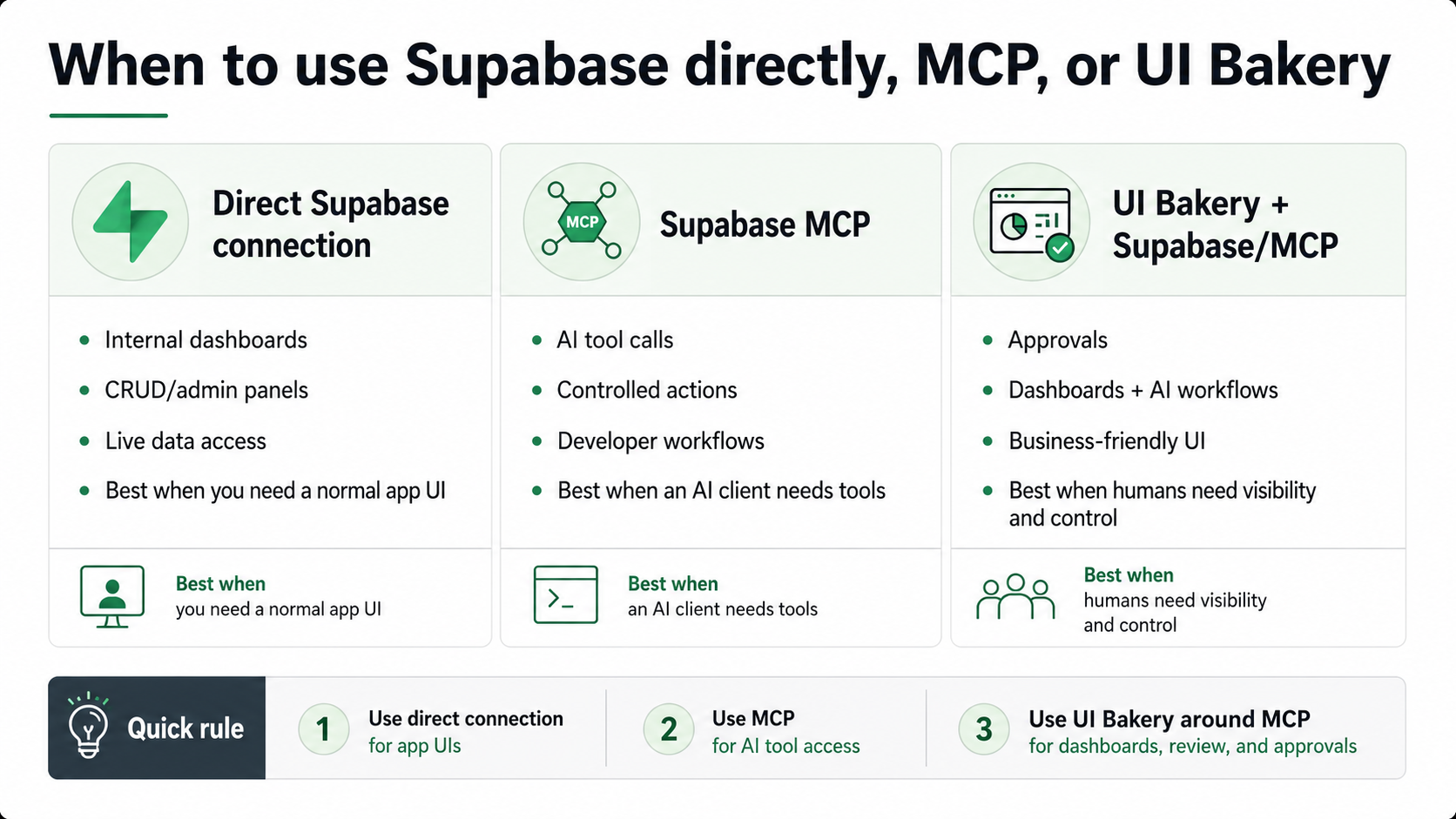
Supabase MCP and a direct Supabase connection solve different problems.
The simplest rule:
Use direct Supabase connectivity when you need an app interface over Supabase data. Use MCP when you need AI tools to call controlled actions. Use UI Bakery around MCP when humans need dashboards, approvals, and operational visibility.
Supabase MCP best practices
A good Supabase MCP implementation should be narrow, permission-aware, and observable.
Start with these best practices:
- Define specific tools instead of exposing broad database access
- Start with read-only actions
- Use Supabase Auth and RLS where possible
- Require explicit user approval for MCP clients
- Avoid giving AI tools production write access by default
- Keep tool responses small and task-specific
- Separate local, staging, and production environments
- Log tool calls and sensitive actions
- Add human approval for risky operations
- Use an internal app layer when workflows need repeatability
The biggest mistake is treating MCP as a shortcut around application design.
MCP can make AI tools more capable, but it does not replace permissions, workflows, interfaces, audit trails, or human judgment.
Supabase MCP for developers
For developers, Supabase MCP is mainly about making AI tools more useful inside real projects.
It can help with:
- schema-aware development
- database context
- local debugging
- tool-assisted workflows
- backend automation
- AI-assisted project maintenance
Supabase’s Edge Functions and mcp-lite example are especially relevant for developers who want to build custom MCP servers that run on Supabase infrastructure. The guide shows how to create an MCP server template, serve it locally, and expose an MCP endpoint through Supabase Functions. (Supabase)
This is a good fit when the team has engineering capacity and wants control over the tools exposed to AI clients.
Supabase MCP for teams
For teams, the bigger question is not “Can we connect AI to Supabase?”
The bigger question is:
How do we make this safe, repeatable, and useful for real operations?
A team-ready Supabase MCP workflow usually needs:
- user permissions
- approval flows
- role-based access
- logs
- clear ownership
- production safeguards
- dashboards
- fallback paths
- non-technical interfaces
That is why many teams will need more than an MCP server.
They may need UI Bakery or another internal app layer to turn MCP-powered operations into usable software.
Final thoughts
Supabase MCP is best understood as an architecture pattern, not a single plug-and-play feature.
For developers, it can make AI tools more useful by giving them controlled access to Supabase-backed systems. For teams, it can support AI-assisted operations, but only if access, permissions, approvals, and visibility are designed carefully.
MCP gives AI tools a way to call tools. Supabase gives you the backend, database, auth, and Edge Functions infrastructure. UI Bakery gives your team the application layer on top: dashboards, admin panels, review queues, approval workflows, and operational interfaces.
Need a structured interface around Supabase-powered workflows? Build an internal tool on top of your Supabase data with UI Bakery.
Next step
Planning a HIPAA-sensitive internal app?
Use the checklist above to map data flow, roles, audit events, vendors, and deployment decisions before the first production workflow ships.
Healthcare operations example
Action Behavior Centers scaled internal operations across clinics with UI Bakery
For a real operational example, review UI Bakery customer stories and healthcare operations patterns.
5,000+users supported in the customer story
400+clinics mentioned in the case study
What is Supabase MCP?
Supabase MCP usually means using Model Context Protocol with Supabase-backed systems. In practice, this often means building an MCP server that connects to a Supabase project, uses Supabase Auth, or runs on Supabase Edge Functions.
Does Supabase provide an official MCP server?
Based on the current Supabase MCP Authentication documentation, Supabase says it does not provide MCP server functionality. Instead, it documents how to build MCP servers that connect to Supabase and use Supabase Auth OAuth capabilities. (Supabase)
Does Supabase MCP require a personal access token?
Not necessarily. If you build an MCP server using Supabase Auth, authentication can flow through OAuth 2.1 and existing Supabase users. Supabase’s docs describe discovery, registration, authorization, token exchange, and authenticated access through Supabase Auth. (Supabase)
Can Supabase MCP write to my database?
It can, if you build tools that allow writes and the authenticated user or service has permission to perform them. For safety, production write access should be limited, logged, and often routed through human approval.
Can I run Supabase MCP locally?
Yes, if you build an MCP server and run it locally. Supabase’s mcp-lite guide shows local development using Supabase CLI, local function serving, and an MCP endpoint that can be tested with clients such as Claude Code, Claude Desktop, Cursor, or MCP Inspector. (Supabase)
What is the difference between Supabase MCP and a direct Supabase integration?
A direct Supabase integration connects your app or internal tool to Supabase data. MCP exposes tools to AI clients. If you want dashboards, admin panels, or CRUD interfaces, a direct connection to UI Bakery may be enough. If you want AI tools to call controlled actions, MCP may be useful.
Should I use Supabase MCP or connect Supabase directly to UI Bakery?
Use connect Supabase directly to UI Bakery when you need internal tools, dashboards, admin panels, or database-backed apps. Use MCP when an AI client needs to call controlled tools or interact with Supabase-backed workflows.
How can teams use Supabase MCP more safely?
Teams should start with read-only tools, use user-based authentication where possible, rely on RLS policies, require explicit user approval, separate staging and production, log tool calls, and add approval interfaces for sensitive actions.





"The UI Bakery platform offers a cost-effective approach to creating applications. With UI Bakery, you can achieve your app development goals without breaking the bank."

"Before switching to UI Bakery we developed a number of apps within the Retool system. The Retool system was good but ultimately did not have the flexibility and feature sets that we required."
Check the Story