

Best ChatGPT Alternatives in 2026: Which AI Is Best for Research, Writing, Coding, and Work?

Updated:
May 17, 2026
The best ChatGPT alternative depends on what you need the AI to do. Claude is the strongest overall option for reasoning, writing, coding help, and long documents. Perplexity is best for research with sources, Gemini is best if you work in Google Workspace, Microsoft Copilot is best for Microsoft 365 users, and Mistral Le Chat is a strong option for privacy-conscious and EU-focused teams.
ChatGPT is still one of the most flexible general-purpose AI assistants. But in 2026, many users no longer want one chatbot for everything. They want the best AI assistant for a specific job: research, writing, coding, office productivity, privacy, or business workflows.
Quick Picks: Best ChatGPT Alternatives by Use Case
If you want the fastest answer, start here:
- Best overall ChatGPT alternative: Claude
- Best for research with sources: Perplexity
- Best for Google Workspace users: Gemini
- Best for Microsoft 365 users: Microsoft Copilot
- Best for privacy-conscious and EU-focused users: Mistral Le Chat
- Best if you want one flexible general-purpose assistant: ChatGPT is still worth keeping
The main point: you do not need to replace ChatGPT with one single tool. Many people get better results by using different AI assistants for different jobs.
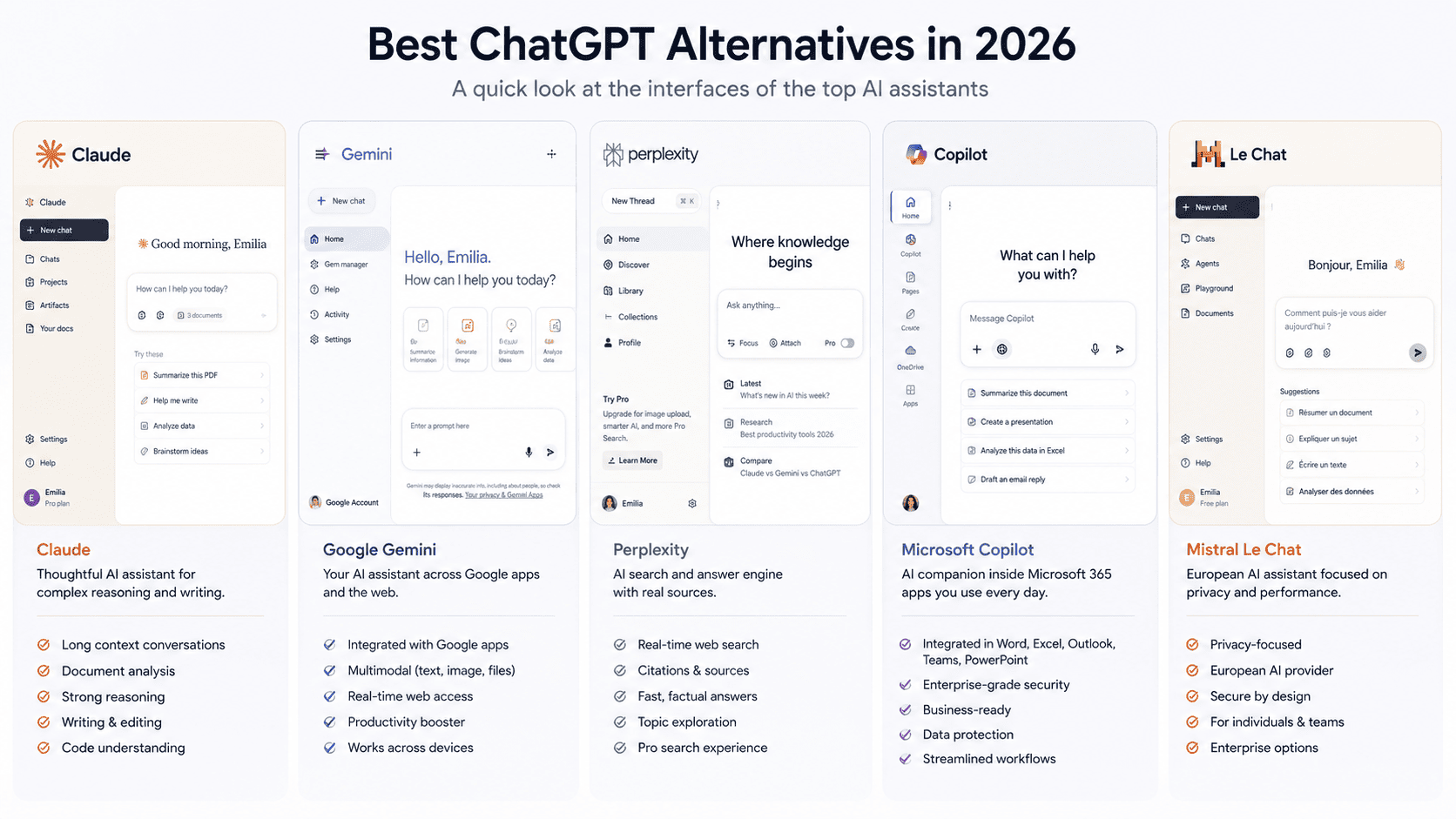
The Best ChatGPT Alternatives Compared
Pricing and plan details change often, especially as AI companies adjust usage limits and packaging. Before choosing a paid plan, check the official pricing page for the latest limits, features, and regional availability. Claude lists a free plan and paid tiers such as Pro and Max; Google offers paid Gemini access through Google AI plans; Perplexity lists Pro and Enterprise options; Microsoft says Copilot Chat is included for eligible Microsoft 365 business users; and Mistral positions Le Chat as part of its broader AI assistant and enterprise offering. (Google One)
Why People Are Looking for ChatGPT Alternatives in 2026
People are not only searching for ChatGPT alternatives because they are unhappy with ChatGPT. The bigger reason is that AI tools have become more specialized.
A researcher needs sources and citations. A writer needs tone control, structure, and reliable editing. A developer may care about code reasoning, repo context, and usage limits. A business user may care less about benchmark scores and more about whether the assistant works inside Google Workspace or Microsoft 365.
That is why the market has moved away from one simple question: “Which chatbot is the smartest?” The better question now is: “Which AI tool fits the work I actually need to finish?”
This is also why a useful list of the best ChatGPT alternatives should not be a long directory of random AI tools. It should help you choose based on real use cases, clear tradeoffs, and practical limitations.
Claude: Best Overall for Reasoning, Writing, and Long Documents
Claude is the best ChatGPT alternative for people who use AI for thoughtful writing, long documents, technical reasoning, and structured analysis. It is especially useful when you need the model to compare ideas, rewrite complex material, summarize large documents, or help turn messy notes into a clear argument.
For writers and marketers, Claude is strong at improving flow, reducing repetition, and keeping a consistent tone across longer drafts. For analysts and operators, it can review documents, extract key points, and organize information into practical next steps. For developers, Claude is also a serious option for debugging, explaining code, and reasoning through technical problems.

Claude is a good fit if you often use ChatGPT for:
- long-form writing
- document review
- strategic planning
- coding support
- research synthesis
- technical explanations
- complex prompts that need careful structure
The main limitation is usage. Like most advanced AI assistants, Claude has plan-based limits, and heavy users may run into them depending on the model, context length, and features they use. If you plan to use Claude all day for coding or large-document work, compare the available plans before switching fully.
Gemini: Best for Google Workspace and Multimodal Work
Gemini is one of the best alternatives to ChatGPT if your work already happens inside Google Workspace. Its biggest advantage is not just the chatbot experience. It is the way Gemini connects to Google’s broader ecosystem, including Gmail, Docs, Sheets, Drive, and other productivity tools.
This makes Gemini useful for people who want AI support inside the tools they already use. Instead of copying content between a chatbot and your documents, you can use Gemini in a more natural workspace context.
Gemini is also a strong option for multimodal work. If your tasks involve text, images, files, search, and productivity apps, it can be more convenient than using a standalone AI assistant.

Choose Gemini if:
- you already use Google Workspace
- you want AI inside Gmail, Docs, Sheets, and Drive
- you work with text, files, and images
- you prefer an AI assistant connected to Google’s ecosystem
The main drawback is ecosystem dependency. If you do not use Google Workspace, Gemini may not feel as valuable. For cited research, Perplexity is usually more direct. For long-form reasoning and writing, Claude may still be stronger.
Perplexity: Best for Research With Sources
Perplexity is the best ChatGPT alternative for research with citations. It is built around search, source discovery, and source-backed answers, which makes it useful when you need to understand a topic quickly and see where the information came from.
This is why many people use Perplexity alongside ChatGPT or Claude rather than replacing everything with it. It is not always the best tool for deep creative writing, coding, or complex workflow planning. But when the task is “find reliable information and show me the sources,” Perplexity is one of the strongest options.
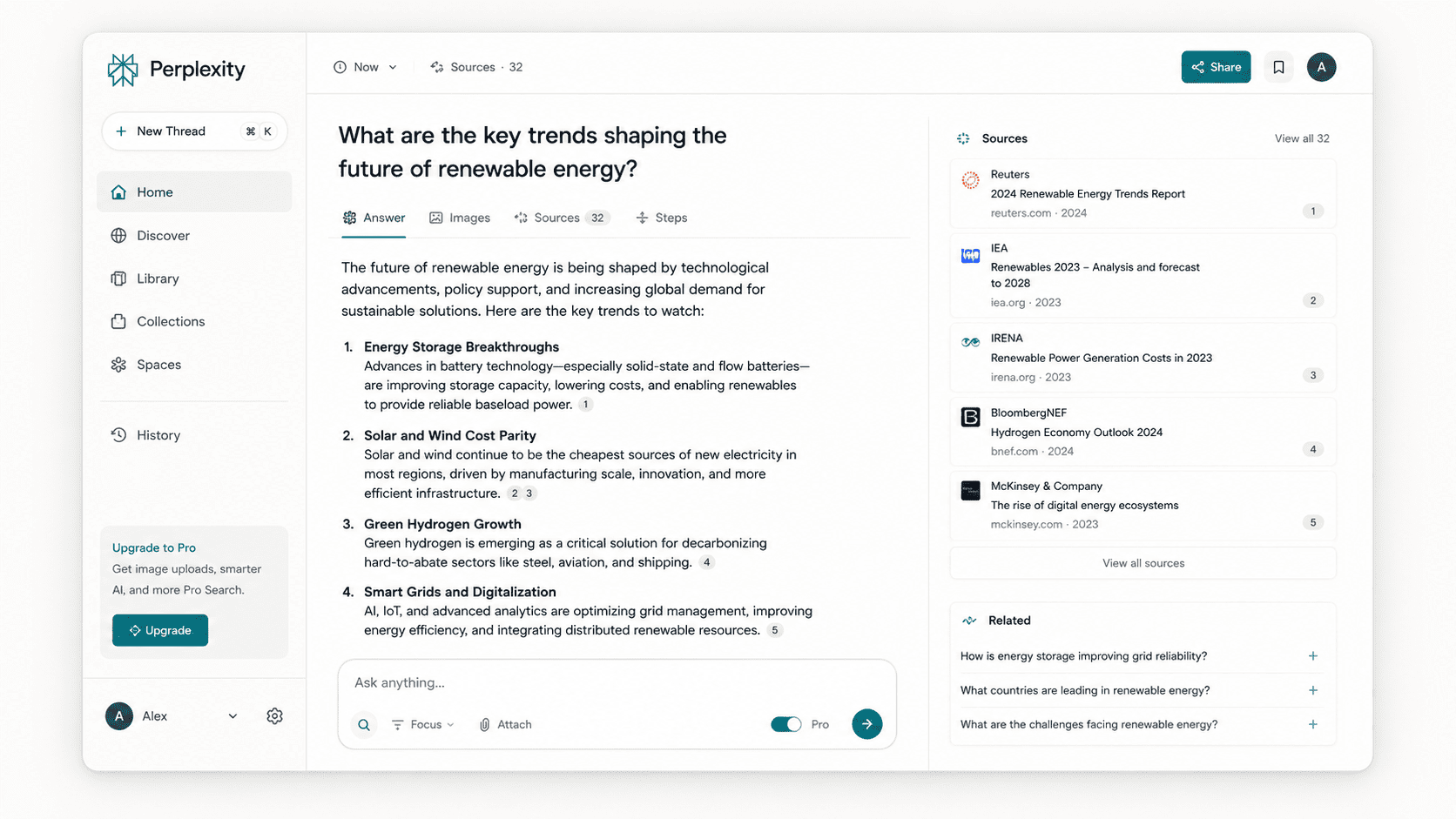
Perplexity is useful for:
- market research
- competitor research
- source-backed summaries
- quick topic exploration
- fact-checking
- finding recent information
- comparing different viewpoints
The limitation is that Perplexity is a research assistant first. It can draft and summarize, but if your main work is long-form writing, detailed reasoning, or coding, Claude or ChatGPT may be more flexible.
Microsoft Copilot: Best for Microsoft 365 Users
Microsoft Copilot is the best ChatGPT alternative for teams that already work in Microsoft 365. Its main advantage is that it sits close to Word, Excel, PowerPoint, Outlook, Teams, and other Microsoft tools.
That matters for business users. A standalone AI chatbot can help with many tasks, but Copilot is more practical when you want AI support inside the environment where your meetings, documents, spreadsheets, and emails already live.
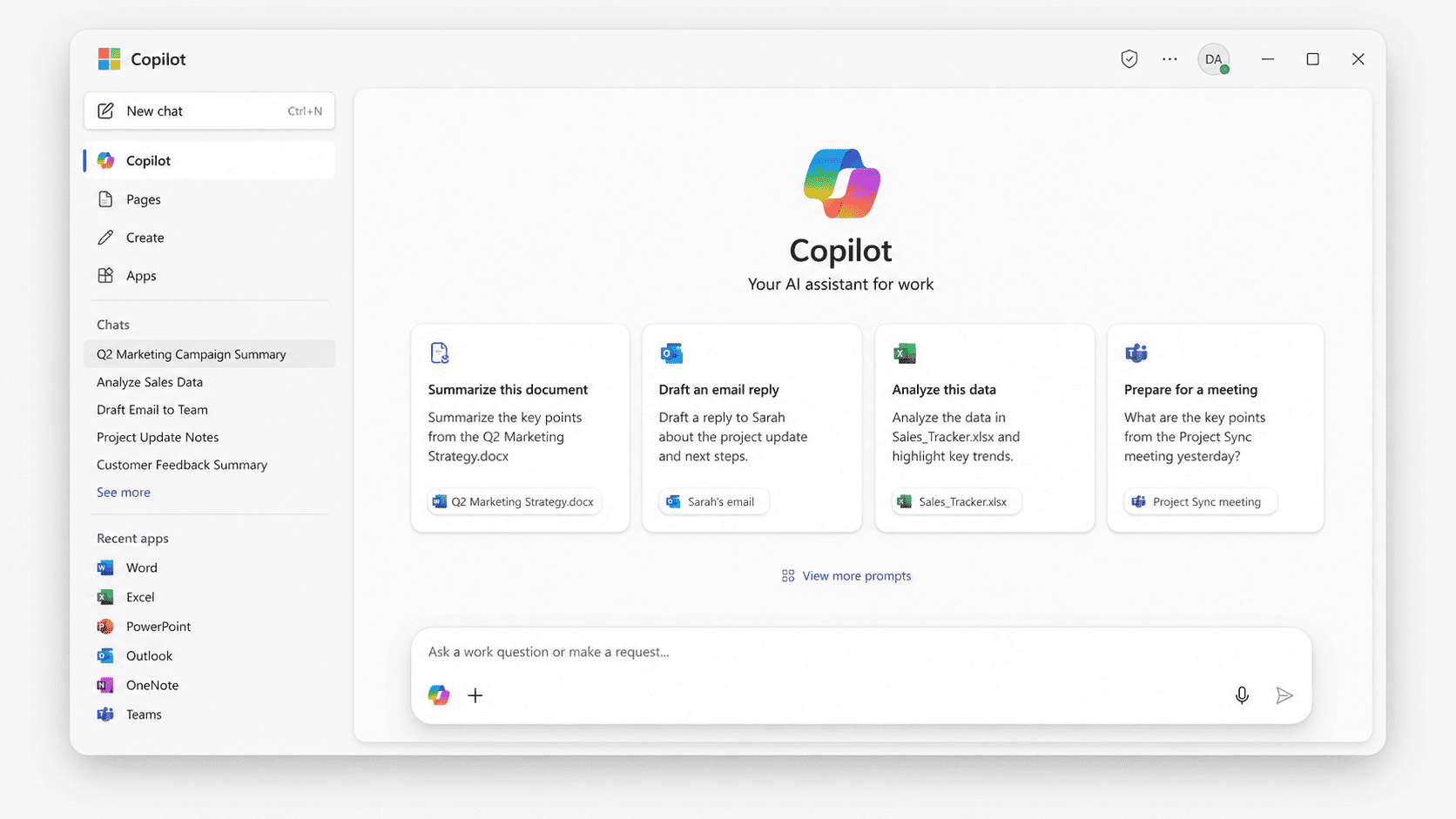
Copilot is a good fit if:
- your company uses Microsoft 365
- your team works heavily in Outlook, Word, Excel, Teams, or PowerPoint
- you want AI support inside existing business tools
- IT prefers a vendor already connected to Microsoft’s enterprise stack
The drawback is that Copilot is less compelling outside the Microsoft ecosystem. If you do not use Microsoft 365, other AI assistants may feel more useful. For research, Perplexity is usually cleaner. For long-context writing and reasoning, Claude may be a better fit.
Mistral Le Chat: Best for Privacy- and EU-Conscious Users
Mistral Le Chat is a strong ChatGPT alternative for users and teams that care about privacy, European AI infrastructure, or vendor diversity. It is not as widely adopted as ChatGPT, Claude, Gemini, or Copilot, but it is a serious option for organizations that want to evaluate AI tools outside the largest US-based ecosystems.
Le Chat is Mistral’s AI assistant for individual and business use. Mistral also positions itself around customizable AI, open models, enterprise agents, and deployment flexibility. For privacy-sensitive teams, that makes it worth evaluating alongside larger AI ecosystems. (Mistral AI)
.png)
Choose Mistral Le Chat if:
- you want to evaluate a European AI provider
- privacy and data control matter to your team
- you want an alternative outside the OpenAI, Google, Microsoft, and Anthropic ecosystems
- you are comparing AI tools for a regulated or security-conscious environment
The main limitation is ecosystem size. ChatGPT, Claude, Gemini, and Copilot have broader adoption, more tutorials, and more third-party integrations. Mistral Le Chat is worth testing, but most teams should evaluate it carefully before making it their default assistant.
How to Choose the Right ChatGPT Alternative for Your Workflow
The easiest way to choose a ChatGPT alternative is to start with the work, not the tool.
If you need research, choose Perplexity. It is the clearest fit when citations, source discovery, and recent information matter.
If you need writing, choose Claude. It is strong at restructuring drafts, improving tone, simplifying complex ideas, and working with long documents.
If you need coding help, compare Claude and ChatGPT first. Claude is strong for code reasoning and technical explanations. ChatGPT is still a strong coding assistant, especially if your workflow already depends on OpenAI tools.
If you need office productivity, choose based on your workspace. Gemini makes more sense for Google Workspace. Copilot makes more sense for Microsoft 365.
If you need privacy or regional control, evaluate Mistral Le Chat and enterprise plans from major AI providers. Look beyond marketing claims and check data retention, training policies, admin controls, regional availability, and compliance requirements.
For teams, there is one more question: what happens after the AI gives an answer?
A chatbot can draft, summarize, classify, or recommend. But in a real business process, someone may need to review the output, approve it, edit it, assign it, track it, or push it into another system. That is where the workflow around the AI becomes just as important as the model itself.
When ChatGPT Is Still the Better Choice
ChatGPT is still the better choice if you want one flexible AI assistant for many different tasks. It remains strong for brainstorming, writing, coding help, file analysis, image work, voice interactions, and general problem-solving.
It may also be the better option if your team already uses it heavily. Switching AI tools has a cost. Prompts need to be adjusted, team habits change, and people need time to compare outputs.
ChatGPT can also make more sense if you rely on the broader OpenAI ecosystem, including custom GPTs, API workflows, or internal tools already built around OpenAI models.
The best answer is not always to replace ChatGPT. For many users, the better setup is to keep ChatGPT as a general assistant and add specialized tools where they clearly perform better.
For example, you might use ChatGPT for general work, Perplexity for research, Claude for long-form writing, Gemini for Google Workspace, and Copilot for Microsoft 365. That kind of mixed workflow is often more realistic than trying to find one AI tool that wins every category.
How Teams Turn AI Answers Into Real Workflows
For individual users, choosing a ChatGPT alternative may be enough. For teams, the AI assistant is usually only one part of the workflow.
A model can generate an answer, classify a ticket, summarize a document, draft a response, or suggest a next step. But business workflows usually need more than an answer. They need review, approvals, permissions, status tracking, auditability, and a way to connect AI output to real business systems.
That is where UI Bakery fits.
.png)
UI Bakery is not a ChatGPT competitor. It does not replace Claude, Gemini, Perplexity, Copilot, or Le Chat. Instead, it helps teams build the internal tools and dashboards around AI-assisted work.
For example, a support team might use an AI model to classify incoming tickets. But the team still needs a dashboard where managers can review high-risk cases, approve suggested replies, assign tickets, and track resolution status. A finance team might use AI to extract invoice data, but still need an approval screen where humans can verify the result before anything moves forward.
UI Bakery can be used to build those internal interfaces: review dashboards, approval queues, admin panels, operator consoles, and workflow tools connected to databases, APIs, CRMs, ERPs, and other business systems. UI Bakery’s AI App Generator specifically works with employee portals, approval workflows, data management tools, ops interfaces, admin panels, databases, APIs, tables, forms, and role-based access, which makes the fit clear for AI-assisted internal workflows.
This distinction matters. If AI only helps one person write faster, a chatbot may be enough. If AI output becomes part of a business process, teams usually need an internal tool around it.
That is the role of UI Bakery: helping teams turn AI-generated outputs into controlled, reviewable, and trackable workflows.
Final Verdict: Which ChatGPT Alternative Should You Choose?
Claude is the best overall ChatGPT alternative for reasoning, writing, coding help, and long documents. But the best choice depends on the work you need to do.
Choose Claude if you need strong reasoning, writing, and document analysis. Choose Gemini if your work lives in Google Workspace. Choose Perplexity if you need research with sources. Choose Microsoft Copilot if your company runs on Microsoft 365. Choose Mistral Le Chat if privacy, European AI infrastructure, or vendor diversity matters.
And if ChatGPT already works well for your team, you may not need to replace it. The better approach may be to add specialized AI tools where they bring a clear advantage.
For teams, the next step is not only choosing the right AI assistant. It is building the workflow around AI output, so people can review, approve, track, and act on it inside real business systems.
Next step
Planning a HIPAA-sensitive internal app?
Use the checklist above to map data flow, roles, audit events, vendors, and deployment decisions before the first production workflow ships.
Healthcare operations example
Action Behavior Centers scaled internal operations across clinics with UI Bakery
For a real operational example, review UI Bakery customer stories and healthcare operations patterns.
5,000+users supported in the customer story
400+clinics mentioned in the case study
What is the best ChatGPT alternative in 2026?
Claude is the best overall ChatGPT alternative in 2026 for reasoning, writing, coding help, and long documents. Perplexity is better for research with sources, Gemini is better for Google Workspace users, Copilot is better for Microsoft 365 users, and Mistral Le Chat is worth considering for privacy-conscious or EU-focused teams.
Which ChatGPT alternative is best for research with sources?
Perplexity is the best ChatGPT alternative for research with sources. It is designed around web research, citations, and source-backed answers, which makes it useful for market research, competitor research, fact-checking, and quick topic exploration.
What is the best free ChatGPT alternative?
The best free ChatGPT alternative depends on the use case. Claude, Gemini, Perplexity, Copilot, and Mistral Le Chat all offer some form of free access or free entry point, but limits and availability vary. For research, start with Perplexity. For writing and reasoning, try Claude. For Google Workspace, try Gemini.
Which ChatGPT alternative is best for coding?
Claude is one of the strongest ChatGPT alternatives for coding, especially for code reasoning, debugging, and technical explanations. ChatGPT is still a strong coding assistant too, so developers should compare both on their own codebase before switching fully.
Are there privacy-focused alternatives to ChatGPT?
Yes. Mistral Le Chat is one of the most relevant options for users who want to evaluate a European AI provider. Enterprise plans from Claude, Perplexity, Microsoft, and Google may also include privacy, admin, and data-control features, but teams should verify data retention, training policies, regional availability, and compliance requirements before choosing.




"The UI Bakery platform offers a cost-effective approach to creating applications. With UI Bakery, you can achieve your app development goals without breaking the bank."

"Before switching to UI Bakery we developed a number of apps within the Retool system. The Retool system was good but ultimately did not have the flexibility and feature sets that we required."
Check the Story